Skip to Primary NavigationSkip to ContentSkip to Footer
  • Personal
  • Business
  • Enterprise
  • Deals
  1. Help & Support - Optus/
  2. Articles/
  3. Optus Pause explained

Optus Pause explained


Optus Pause is coming to an end from 7th October. Find out more.
 

Optus Pause is a new tool built into My Optus app, available at no additional cost, designed to help manage the time you and your family spend online. Optus Pause allows you to pause the internet on eligible Optus mobile and home WiFi connections from your iOS and Android devices.

Optus Pause is progressively being rolled out to everyone's app. If Optus Pause isn't available in your app yet, check back for an update at a later stage.

In this article, we'll explain how it works and tips to get you started.


If you're the account holder, Optus Pause will allow you to temporarily pause the internet across all eligible services linked to your My Account.


From the my Optus app, You'll be able select your eligible and home WiFi connections as well as the amount of time you'd like to pause the internet for. 


If you have an nbn® service with an eligible modem, you'll also be able to disable the Internet on all devices connected to your modem. See eligible devices for modem compatibility.


Tip:
Unable to see all your services? Contact us by messaging us via the My Optus app. 

Before you begin, make sure you're using the latest version of the My Optus app. If you're the account holder, follow the instructions below:

  1. Open the My Optus app (make sure you're using the latest version of the app)
  2. If you haven't already, login to My Account via the app
  3. Select the Optus Pause tile on the My Optus app For You screen, it can also be found within the more section of the app
  4. Before you turn on Optus Pause you can select the connections you'd like to pause
  5. Select the large Pause button located in the middle of the screen to activate Optus Pause

To activate Optus Pause, follow the steps below:


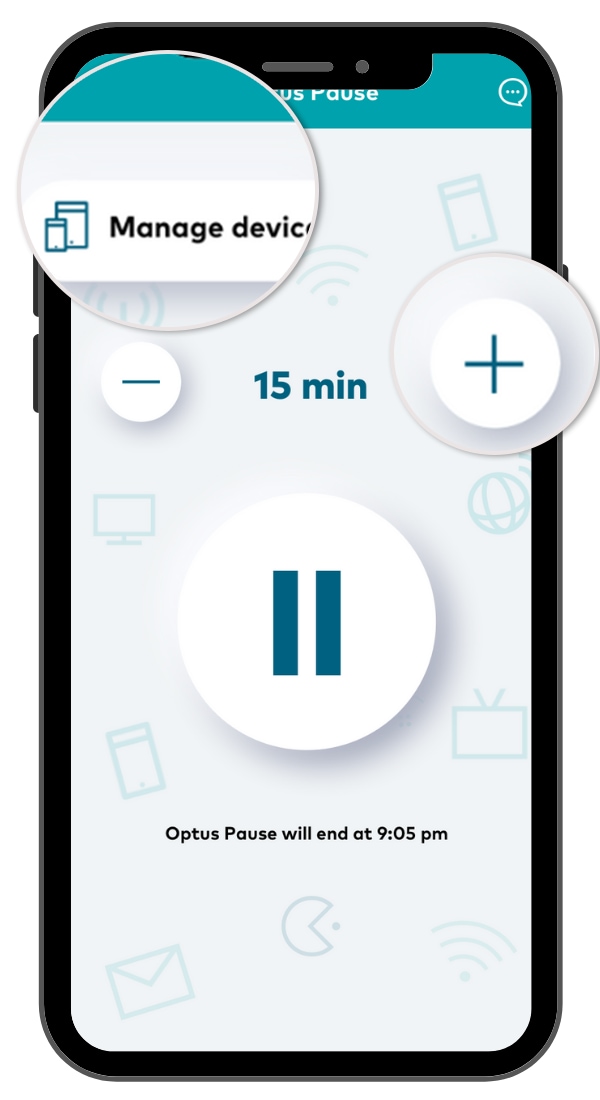
Optus Pause home page MOA UX

  1. Open the My Optus app
  2. Select the Optus Pause tile on the My Optus app for you screen
  3. Select the Manage devices tab to select the devices included in your Optus Pause session
  4. Set the duration of your Optus Pause session by tapping the + or - icon (up to maximum of half an hour)
  5. Select the Pause button to activate a session
  6. Once active, a countdown timer will be displayed from the For You screen


Note:
If you need to add or remove devices from your Optus Pause session, you will need to stop your current session and commence a new one.

If you've paused the internet on all devices connected to your home WiFi modem and you'd like to access the My Optus app, make sure that WiFi on your mobile device is turned off.

Optus Pause will automatically end once the time hits zero. If you would like to end Optus Pause early you can access Optus Pause from My Optus app and end the session.


If you're having trouble switching off Optus Pause via the app, send us a message.

If you're a consumer or small business customer, Optus Pause is available with at least one of the following product types:

  • Postpaid Mobile
  • Prepaid Mobile
  • NBN Home Internet (eligible modems only)
  • Mobile Broadband
  • 4G Home Internet
  • 5G Home Internet

Connected devices

Optus Pause can be used regardless of the mix of different device brands or operating systems in your household (i.e. iOS, Android, Windows).

Eligible modems

If you're an nbn customer with one of the below modems, you'll be able to use Optus Pause at launch:

  • Sagemcom F@st 5366 TN
  • Optus Ultra WiFi modem (Gen 2)


If you have an NBN service, but do not have a compatible modem, you'll need to switch to a plan that includes one of the above modems.

Learn how to recontract your Home Internet service here .

Does Optus Pause also restrict calls or SMS?

No, you can only restrict internet use, and while Optus Pause is active, you can still make and take calls, including emergency calls, and send and receive SMS.


Do I need to pay extra for Optus Pause?

Optus Pause is a feature that's built into My Optus app and doesn't cost anything extra to use for eligible Optus customers, although data charges may apply to download My Optus app.


Can I pause on devices from other networks?

Yes. Provided they are on an eligible Optus service at the time. For example, a Telstra mobile using Optus home WIFI will still be able to have the wifi connection paused.


Why is the My Optus app not working when Optus Pause is active?

When you have Optus Pause active on your device, you should make sure that WiFi on your device is turned off if you would like to access the My Optus app.


Can I control my non-Optus services with Optus Pause?

You can only pause your eligible Optus services on the same account with My Optus app.


Can anyone who is using a device that's connected to an Optus service use Optus Pause on that service?

Only the account holder - verified with a valid My Account log in - can pause that service.

Can services from different accounts use Optus Pause together?

At this stage, only services on the same account will be able to use Optus Pause together. If you have your service numbers across multiple accounts, you will need to perform an 'account consolidation' to bring these services together.

If you're still having issues, message us we'll be happy to help.

What do I do if my Optus app is down when I need to turn off Optus Pause?

You should contact Optus customer care if you need extra help turning off Optus Pause. If you're still having issues message us, we'll be happy to help.

If I disable internet devices connected to my nbn, can I still use my nbn voice service?

Yes, internet access will only be disabled on the devices selected and will not impact your nbn voice service.


Can I still use Optus Pause if I'm using my own modem?

You need to be using either the Optus supplied Ultra WiFi Modem or TN modem in order to use Optus Pause. If you're using another modem, including your own supplied modem or WiFi Mesh device, you won't be able to use Optus Pause on the devices on your network.


I have connected my device to one of the eligible Optus Modems but cannot see it?

If you have recently connected a device to the modem you may need to press the Refresh button in order for the devices to appear. If using a WiFi Mesh that is not the Optus provided Sagem device, it may also be hiding devices, so might not be visible to Optus Pause.


Will Optus Pause apply to services that are roaming?

If a service that is roaming is included in Optus Pause its mobile connectivity will not be paused.

Will I still be able to use services such as WhatsApp, iMessage or FaceTime?

If Optus Pause is turned on, then all apps that use the internet, such as WhatsApp, will no longer be able to access the internet. If you want to send messages or make calls, you need to do so via traditional calls or SMS.


Will I also be able to control which devices get affected by Optus Pause on my 5G or 4G Home Internet service?

At launch, only Optus nbn customers using eligible modems will be able to customise which devices connected to their modem will be affected by Optus Pause.


Will Optus Pause also disable internet on my Apple Watch?

When you have Optus Pause active on a service this will also disable internet to the linked Apple Watch service.


Can I still use My Optus app and other features with Optus Pause active?

Yes. When Optus Pause is active, if you're using a device connected to the mobile network, you can still access My Optus app and features including messaging, viewing your data usage or bill, and Donate Your Data, plus access to the Optus website.


How many services can I use Optus Pause for?

At this stage Optus Pause can be used by customers that have up to and including 30 Optus services.


When Optus Pause is active what will I see?

When Optus Pause is active you will still see your device has internet access however when you try and access the internet you will not be able to. Some apps you use may buffer information from your last session so even though Optus Pause is active you may still see recent information in the app.


Once Optus Pause is activated will I be able to edit the service and devices that are included in the session?

When Optus Pause is activated you will not be able to change the services and devices you chose. If you would like to choose different services or devices you will need to turn off Optus Pause and change your selection before activating Optus Pause again.


Will I still be charged while Optus Pause is active?

Yes, you will still be charged for your Optus service/s during the time that Optus Pause is active.
Related Articles

How to pay your bill

How to change plans

Change ownership of your service

A guide to eSIM

Home Internet WiFi username & password help

Popular articles

Orders, deliveries & returns

How to check network status & outages

Home Internet WiFi username & password help

Home Internet troubleshooting

Get in touch

  • Get My Optus app
  • Contact us
  • Find a store

Need more help?


Getting started


Billing and recharge


Troubleshooting


Device Guides


5G Mobile


Broadband & NBN


Manage my account


Optus Sport


Email


5G Home Broadband


Entertainment


Coverage and travel


Home phone


Business


Consumer advice


More from Optus

  • My Optus App
  • SubHub
  • Accessories
  • Student Hub

Customer Service

  • Contact Us
  • Help & Support
  • Store Locator
  • Payment Assistance Policy
  • Feedback & Complaints
  • Report a service outage

About Us

  • About Optus
  • Careers
  • Corporate Information
  • Media Releases
  • About Singtel
  • Accessibility

  • Blog
  • Connect With Us on facebook
  • Connect With Us on instagram
  • Connect With Us on tiktok
  • Connect With Us on linkedin
  • Connect With Us on twitter
  • Connect With Us on youtube

  • Critical Information Summaries
  • Standard Agreement
  • Privacy, Security & Safety

Connect with us

  • Blog
  • Connect With Us on facebook
  • Connect With Us on instagram
  • Connect With Us on tiktok
  • Connect With Us on linkedin
  • Connect With Us on twitter
  • Connect With Us on youtube
  • Critical Information Summaries
  • Standard Agreement
  • Privacy, Security & Safety
© 2026 Singtel Optus Pty Limited
Optus acknowledges the Traditional Custodians of the lands, waters and skies across Australia. We pay our respects to Elders past and present and honour the strength and continuity of the world's oldest living cultures.