Skip to Primary NavigationSkip to ContentSkip to Footer
  • Personal
  • Business
  • Enterprise
  • Deals
  1. Help & Support - Optus/
  2. Articles/
  3. Getting started with Optus WiFi Secure

Getting started with Optus WiFi Secure


From the 30th of July, you will no longer be able to purchase Wifi Secure. If you have already subscribed to this feature before this date, you can continue to use it as usual. Find out more.
 

Optus WiFi Secure™  is an online security solution available on a month by month subscription basis as:

  1.  As an inclusion on Internet Ultimate plans at no extra charge;

    or

  2. An add-on to selected eligible Optus nbn® Home Internet plans for an extra $5 per month

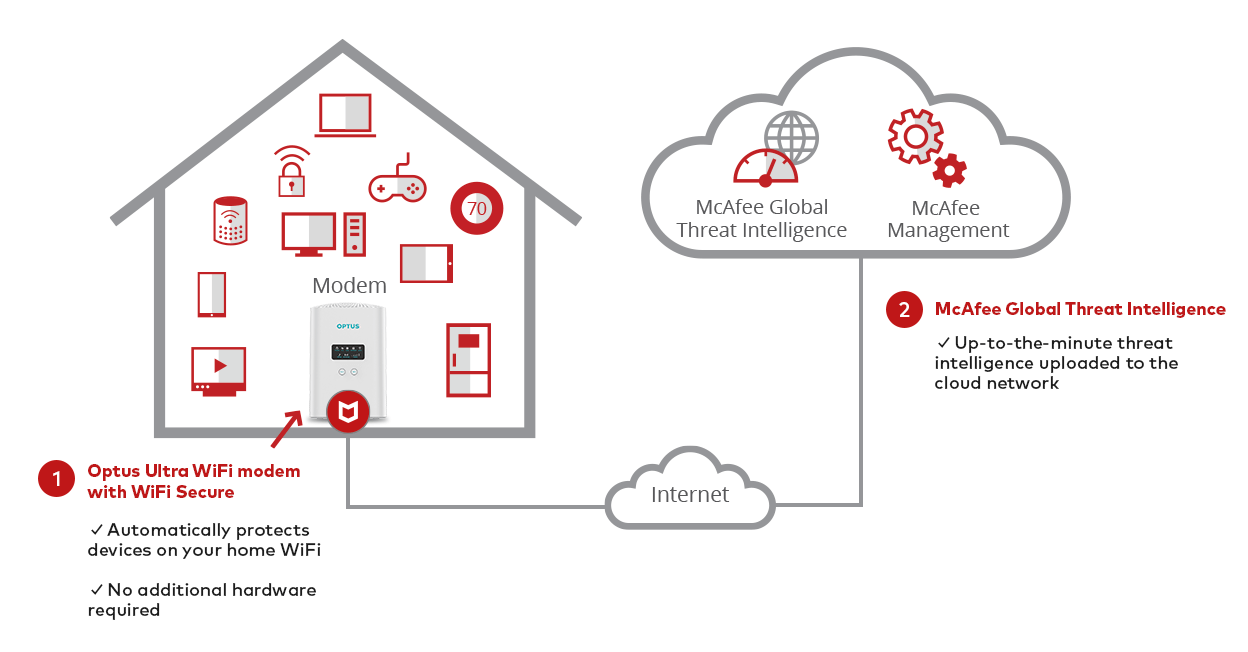
Optus has partnered with McAfee® to create Optus WiFi Secure. WiFi Secure automatically protects your family and your business from malicious websites and smart device attacks by protecting all the devices connected to your compatible Optus modem.


In this article, we'll explain how Optus WiFi Secure works and what you'll need to do to get started.


WiFi Secure is designed to actively provide built-in protection for every device that is WiFi connected to the Internet via your Compatible Modem.


When any device connected to your home / business network attempts to access a website, WiFi secure performs a reputation check via McAfee's Global Threat Intelligence (GTI) platform.


GTI is constantly working to analyse and detect known and emerging cyberthreats. Information provided is near real-time, thus offering the most up to date information to ensure you and your device(s) are protected.

How does WiFi Secure work

If the website is known to be malicious, access to the website will be blocked. For some sites, you'll also have the option to ignore the warning and continue.


WiFi Secure also blocks attempts to access devices connected to your home or business WiFi including security cameras, baby monitors and smart locks.

As long you have an eligible nbn plan with an eligible modem, you'll be able to use WiFi Secure. Eligible modems include the:

  • Optus Ultra WiFi (Gen 2) modem
  • Sagemcom F@st 5366TN modem
  • Optus Ultra WiFi (Gen 1) modem

Add WiFi Secure via the My Optus app

WiFi Secure is a month by month subscription service available either as an inclusion on Internet Ultimate and Internet Ultimate 100 plans or can be added to eligible nbn Internet plans for $5.00 per month.

If you wish to add WiFi Secure to your eligible nbn Internet plan it can be added via the Add-ons section of the My Optus app:

  1. Open the My Optus app
    Make sure you're on the Home Internet version of the app (you can select your nbn Home Internet service by selecting the toggle tool on the top left-hand corner of the app)
  2. Select Service
  3. Select Add-ons
  4. Select Optus WiFi Secure
  5. If you're eligible, select Buy now
  6. You'll receive an email and/or SMS to confirm WiFi Secure has been added and ready for use

On an Internet Ultimate plan

From 29 March 2021, If you sign up for an Internet Ultimate or an Internet Ultimate Fast Plan, WiFi secure is included at no additional cost and will be automatically added to your plan.


If you signed up for one of these plans prior to 29 March 2021, you'll need to manually add WiFi secure via the My Optus app by following the steps above.


WiFi Secure can also be added to your plan by visiting us in-store, messaging us via the My Optus app or speaking to us on 133 937.

We've made it really simple to enable WiFi Secure. As soon as it's added to your plan, it'll be automatically activated and switched on.

  1. If you sign up for an Internet Ultimate Plan from 29 March 2021 or if you add WiFI Secure to your eligible nbn plan at time of purchase, it'll be activated as soon as you're connected. If you're an existing customer, it'll be activated as soon as it's added to your plan

  2. If you subscribe to WiFi secure via the My Optus app, WiFi Secure will show as active in the My Optus app. You'll also receive an order confirmation via email and/or SMS

Note: To temporarily switch off WiFi secure, you'll need to access your modem settings and toggle WiFi secure off. You will still be billed for WiFi Secure if you temporarily switch it off.

If you've signed up to the Internet Ultimate Plan, you'll see a $5.00 charge and corresponding credit.


If you've subscribed to WiFi Secure on a month by month basis, you'll see a $5.00 charge on your bill.

What is Optus WiFi Secure?

Optus WiFi Secure™ is a month to month subscription service that protects you and your family from malicious threats while they're online via a WiFi connection from a compatible Optus supplied modem, using an Optus nbn Internet service.


Optus WiFi Secure™ provides security against many online threats such as malicious websites, botnet attacks, and Denial of Service attacks. It helps to make sure all Internet traffic passing through the compatible Optus supplied modem to any device connected to your home or business network is safe from these threats.


Does WiFi Secure provide virus protection?

No, Optus WiFi Secure by itself doesn't provide anti-virus protection. WiFi Secure's primary purpose is to prevent navigation to websites that may contain malicious threats. You can pair Optus WiFi Secure with any recognised anti-virus security product.


Am I eligible for Optus WiFi Secure?

Optus nbn customers with a compatible Optus supplied modem are eligible for Optus WiFi Secure™. Currently, the two compatible modems are the Optus Ultra WiFi modem and Sagemcom 5366 TN modem.

The following current Optus nbn plans (from 7 July 2025) are ineligible for Optus WiFi Secure: 

  • Optus Basic nbn
  • Optus Everyday nbn
  • Optus Fast nbn
  • Optus Ultrafast nbn
  • Optus nbn Promo plan


What will I see on my bill?

You'll see a charge of $5 per month for Optus WiFi Secure™. When you purchase an Internet Ultimate Plan will also see a discount for $5 per month, as WiFi Secure is included with these plans at no additional cost.

How do I activate my subscription?

Once you've added Optus WiFi Secure™ to your existing plan, your subscription should activate automatically. You can check whether it is active on My Optus app.


You'll need to upgrade your modem to a compatible Optus supplied modem, Optus WiFi Secure will be active when you're connected to the Optus nbn service via your new modem.


If you've signed up to an Internet Ultimate Plan after 29 March 2021 where WiFi Secure is an inclusion, it will automatically be activated for you once your nbn service is activated. There will be no additional action required to set up or turn on the product in this instance.


For customers on an Internet Ultimate Plan prior to 29 March 2021, Optus WiFi Secure will be provided as an inclusion, and customers will need to activate via the add-on section in My Optus app or by contacting Optus.


I've turned off WiFi Secure via the GUI (Modem Interface); why does My Optus App show that it's still active?

If you turn off WiFi Secure via the modem interface, you're still subscribed to the service meaning you can turn it back on at any time but will still be charged.


If you wish to cancel WiFi Secure permanently and no longer wish to be billed for this, please cancel via My Optus app or by contacting us. It will then no longer appear active on your app and you will no longer be charged for the product.


Why isn't WiFi Secure working even though I'm connected to nbn?

Provided you're using a compatible Optus supplied modem and have added or activated the service; Optus WiFi Secure is working. However, please note that whenever rebooting your modem, there may be a 2-5 minute delay for WiFi Secure Service to reconnect, which means the service won't be active during this time. If you're having issues with your service, please contact us.
Related articles

Switching off and unsubscribing from WiFi Secure

Related Articles

How to pay your bill

How to request more time to pay your bill

How to view your Optus bill

My Optus service is not working: troubleshooting index

How to unlock your mobile device from the Optus network

Popular articles

Orders, deliveries & returns

How to check network status & outages

Home Internet WiFi username & password help

Home Internet troubleshooting

Get in touch

  • Get My Optus app
  • Contact us
  • Find a store

Need more help?


Getting started


Billing and recharge


Troubleshooting


Device Guides


5G Mobile


Broadband & NBN


Manage my account


Optus Sport


Email


5G Home Broadband


Entertainment


Coverage and travel


Home phone


Business


Consumer advice


More from Optus

  • My Optus App
  • SubHub
  • Accessories
  • Student Hub

Customer Service

  • Contact Us
  • Help & Support
  • Store Locator
  • Payment Assistance Policy
  • Feedback & Complaints
  • Report a service outage

About Us

  • About Optus
  • Careers
  • Corporate Information
  • Media Releases
  • About Singtel
  • Accessibility

  • Blog
  • Connect With Us on facebook
  • Connect With Us on instagram
  • Connect With Us on tiktok
  • Connect With Us on linkedin
  • Connect With Us on twitter
  • Connect With Us on youtube

  • Critical Information Summaries
  • Standard Agreement
  • Privacy, Security & Safety

Connect with us

  • Blog
  • Connect With Us on facebook
  • Connect With Us on instagram
  • Connect With Us on tiktok
  • Connect With Us on linkedin
  • Connect With Us on twitter
  • Connect With Us on youtube
  • Critical Information Summaries
  • Standard Agreement
  • Privacy, Security & Safety
© 2026 Singtel Optus Pty Limited
Optus acknowledges the Traditional Custodians of the lands, waters and skies across Australia. We pay our respects to Elders past and present and honour the strength and continuity of the world's oldest living cultures.