Skip to Primary NavigationSkip to ContentSkip to Footer
  • Personal
  • Business
  • Enterprise
  • Deals
  1. Help & Support - Optus/
  2. Articles/
  3. Upgrading to nbn Fibre | Fibre Connect

Upgrading to nbn Fibre

A Fibre Upgrade allows you to have fibre optic cable brought into your home allowing you to enjoy access to faster internet speeds when compared to speeds delivered via nbn's Fibre to the Node (FTTN) or Curb (FTTC) connections. It essentially replaces the copper-based services that use existing telephone lines to connect you to the internet.

You can check whether you are eligible through our Optus nbn® Fibre Upgrade page. Customers on Fibre to the Node (FTTN) or Fibre to the Curb (FTTC) technologies in selected areas may be eligible to upgrade to Fibre to the Premises (FTTP) when ordering specific internet plans.

With nbn® fibre (FTTP) connected to your address, depending on the plan you choose, you can access faster download and upload speed plans for a faster and more reliable connection given you're no longer relying on aging copper (FTTN/C connections).

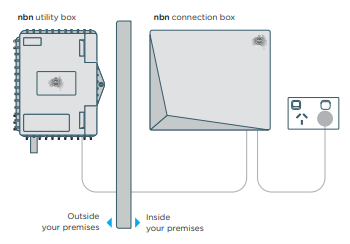
  • An nbn technician attends your premise - they'll install new equipment outside and within your premise.


  • For more information, please refer to nbn's install guide.
  • New cabling installed - the nbn technician should advise how best to run the fibre cable to your premise. Where possible, they'll utilise existing conduit, however, there may be a need to undertake some digging.
  • Allow 2-4 weeks - from ordering to completion, most upgrades are completed within 2-4 weeks, though this can be longer in some instances.
  • Allow 2-3 hours on the day - your appointment will typically be an AM or PM arrival window for the nbn technician and you'll need to allow 2-3 hours from the time the technician arrives for the installation to be completed.
  • On arrival - the nbn technician will explain the entire process and will suggest the best location to install the required equipment. Typically, the internal connection device is installed within 12 metres of where the fibre cable enters your premise.
  • Select the best internal position - select a central location for the equipment installation to ensure that you get the best Wi-Fi coverage throughout the premise. Avoid selecting garages, wet areas, and bedrooms.
  • Agreement to proceed - after explaining the end-to-end process with you, the nbn technician will ask for your permission to proceed. If for any reason you are not comfortable, you can choose to postpone or cancel the upgrade.
    Preparing for a Fibre Upgrade/Things to consider/Wi-Fi vs booster vs internal cabling

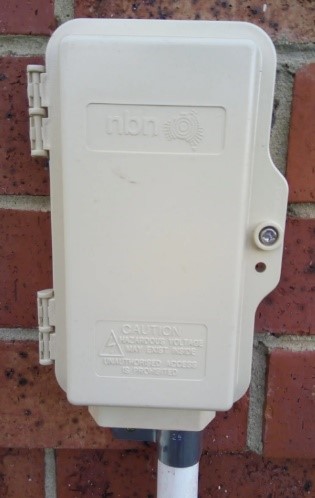
    Before the installation - consider where you want the nbn equipment installed. Typically, this needs to be within 12 metres of where the existing copper connects to the outside of your premises. Below is an example of how to identify where copper cabling connects to the exterior of your premise.


    • Connecting your Optus modem: Your FTTP connection may be in a different room to your existing copper connection. You'll need to consider how best to connect your existing services in the new location and how this may affect your Wi-Fi coverage in the home.
      • When choosing where to have equipment, you should consider a location central to the main usage areas to ensure good Wi-Fi coverage and avoid garages, wet rooms, and bedrooms.
      • To ensure optimal Wi-Fi performance in your home, you may want to consider a Wi-Fi booster, especially if you're ordering a faster speed plan.
      • If you would like the equipment installed in a specific location that isn't supported by nbn's standard installation allowances, you can arrange for additional internal cabling via a registered cable provider at your own expense to allow for the nbn equipment to be installed in your preferred position. For more information, please refer to nbn's FTTP cable pathways fact sheet.
    • Renting? - If you're renting, remember to get your landlord's permission before your appointment date is set.
    • Getting the best Wi-Fi experience: Choosing the right location for your modem and any subsequent Wi-Fi boosters you have is critical to ensuring that you get the best experience throughout your home. For best results, place your Wi-Fi modem approximately 1 metre off the ground.
    • Once you have your modem and any Wi-Fi mesh (booster) devices set up, it's important that you select the right Wi-Fi network to connect your devices to. You may notice two different Wi-Fi networks available on your device - 2.4Ghz or 5Ghz.
      • 4Ghz - sends the Wi-Fi signal further throughout your premise but generally at slower speeds
      • 5Ghz - supports higher speeds but may have limited reach within your premise.
    • We suggest testing your devices on each network to determine which one provides the better connectivity experience for your premises.
    How do I order a Fibre Upgrade?/ New vs existing Optus customers

    Whether you're a new or existing customer, our staff in our Retail stores and experts online will be able to assist you with confirming eligibility and getting your Fibre Upgrade order underway. Simply contact us when you’re ready.

    • Existing Optus Customers: Once the nbn technician has completed their installation, they will notify Optus accordingly.
    • Switching your service over is as simple as plugging in your modem to the nbn equipment.
    • Optus will activate your FTTP connection which may take up to 30 minutes to complete the switch over. Only once you’re online with your fibre connection will Optus organise to have your old copper-based connection turned off.
    • New customers to Optus: Once the nbn technician has completed the installation, Optus will activate your new FTTP connection.
    • Optus will send you a message when it's time to plug in your modem and start using your internet connection.
    • After your FTTP connection has been activated, if you have an existing copper-based connection (FTTN/C), you will need to contact your old service provider to cancel this service.

    What happens if I change my mind and don't want a Fibre Upgrade?

    • Should you wish to cancel your Fibre Upgrade prior to the day of installation, please notify us as soon as possible so that we can notify nbn Co.
    • Should you, after discussing the process with the nbn Co technician on the day of installation, make the decision not to proceed, just advise the technician who will advise Optus.
    • No charge is incurred should you decide not to proceed with the Fibre Upgrade, provide any supplied equipment as part of your upgrade order is returned to Optus.


    Can I change back to copper if I'm not happy with the upgrade?

    • Once the copper connection at your address is disconnected, it may not be possible to reconnect a copper connection at your address.
    • If you are upgrading an existing Optus internet service at your address, the copper connection will be disconnected once you plug your modem into the fibre connection.
    • If you have a copper service with another provider, the copper connection will remain active until you contact your previous provider to disconnect it.
    • Your previous provider may continue to charge you your usual access fee until you contact them to disconnect the old service.


    I want the nbn equipment installed in a specific place.

    On the day of installation, please consult with the nbn technician prior to any work commencing so that you are both in agreement as to the location of both the network termination device and your modem within the premise. If you would like the equipment installed in a specific location that isn't supported by nbn's standard installation allowances, you can arrange for additional internal cabling via a registered cable provider at your own expense to allow for the nbn equipment to be installed in your preferred position. For more information, please refer to nbn's FTTP cable pathways fact sheet.


    I received an SMS/email from Optus that says I'm eligible for a Change of Access Technology (COAT) offer. What does this mean?

    In some instances, Optus will contact customers proactively to advise them that their nbn service is not performing to the level that we or nbn Co would expect. Customers who receive these communications are entitled to a Fibre Upgrade without purchasing a higher speed plan. For more information please refer to our COAT page.


    I have an older Optus plan, can I keep my existing plan?

    • Most customers who take up the Fibre Upgrade option can remain on their existing plan. However, in some cases, there may be customers who need to update their plan due to the age of the plan in question. Our experts will be able to confirm this for you prior to submitting a Fibre Upgrade order on your behalf.
    • Customers at FTTN addresses require a minimum speed of Everyday Fast, Business 100/40 or an equivalent speed pack (Speed Pack 3+ or higher) to order a Fibre Upgrade.


    I have a 4G/5G Optus service, can I upgrade to fibre?

    If you currently have an active 4G or 5G Internet service with Optus and want to consider making the switch to a Fixed (nbn) internet service whilst taking advantage of the Fibre Upgrade opportunity in the process, we can certainly help you with that. Simply reach out to our helpful staff for assistance so that we can explain the various considerations you need to be across prior to you making a decision. If you're on an existing 4G or 5G Internet contract with Optus, device payout fees may apply. Contact us for more information.


    What happens to my copper service when I upgrade (Optus vs non- Optus customer)

    • If you're a new customer to Optus, the existing copper service will remain in place until it's disconnected with your existing service provider.
    • If you're upgrading an existing Optus service, we will switch off the copper access once we have detected your service is up and running on the new FTTP connection.


    Will I be forced to upgrade?

    The Fibre Upgrade opportunity is voluntary. We do however recommend upgrading to FTTP to better support ever-growing connectivity demands within each premise.
    Related Articles

    How to pay your bill

    Your bill explained

    Change ownership of your service

    My Optus service is not working: troubleshooting index

    A guide to eSIM

    Popular articles

    Orders, deliveries & returns

    How to check network status & outages

    Home Internet WiFi username & password help

    Home Internet troubleshooting

    Get in touch

    • Get My Optus app
    • Contact us
    • Find a store

    Need more help?


    Getting started


    Billing and recharge


    Troubleshooting


    Device Guides


    5G Mobile


    Broadband & NBN


    Manage my account


    Optus Sport


    Email


    5G Home Broadband


    Entertainment


    Coverage and travel


    Home phone


    Business


    Consumer advice


    More from Optus

    • My Optus App
    • SubHub
    • Accessories
    • Student Hub

    Customer Service

    • Contact Us
    • Help & Support
    • Store Locator
    • Payment Assistance Policy
    • Feedback & Complaints
    • Report a service outage

    About Us

    • About Optus
    • Careers
    • Corporate Information
    • Media Releases
    • About Singtel
    • Accessibility

    • Blog
    • Connect With Us on facebook
    • Connect With Us on instagram
    • Connect With Us on tiktok
    • Connect With Us on linkedin
    • Connect With Us on twitter
    • Connect With Us on youtube

    • Critical Information Summaries
    • Standard Agreement
    • Privacy, Security & Safety

    Connect with us

    • Blog
    • Connect With Us on facebook
    • Connect With Us on instagram
    • Connect With Us on tiktok
    • Connect With Us on linkedin
    • Connect With Us on twitter
    • Connect With Us on youtube
    • Critical Information Summaries
    • Standard Agreement
    • Privacy, Security & Safety
    © 2026 Singtel Optus Pty Limited
    Optus acknowledges the Traditional Custodians of the lands, waters and skies across Australia. We pay our respects to Elders past and present and honour the strength and continuity of the world's oldest living cultures.