Skip to Primary NavigationSkip to ContentSkip to Footer
  • Personal
  • Business
  • Enterprise
  • Deals
  1. Help & Support - Optus/
  2. Articles/
  3. Optus device repayment options

Optus device repayment options

Here's everything you need to know about our device repayment options and device credits.


OptusPay is how we refer to the interest free device payment option for phones, tablets and smart watches that allows you to own your device and pay it off over time with Optus, provided you remain on an eligible Optus Plan. Rather than paying the total cost of your device upfront, the repayments are spread over 12, 24, or 36 month repayment term.


OptusPay is available when you sign up to an eligible SIM plan and purchase a mobile, tablet or smart watch. For each Optus SIM plan you can use OptusPay for one device.

The device charge will appear on your monthly bill.

Important: Make sure to choose the device repayment term that best suits you as you'll be unable to change the length of your repayment term after sign up.

A Device Payment plan is how we refer to the interest free payment option for accessories and some Home Broadband modems and devices that allows you to own your device and pay it off over time with Optus, provided you remain on an eligible Optus Plan

Instead of paying for your , the repayments are spread over a period of 12, 24, or 36 months. Your monthly repayment will depend on the length of your plan.

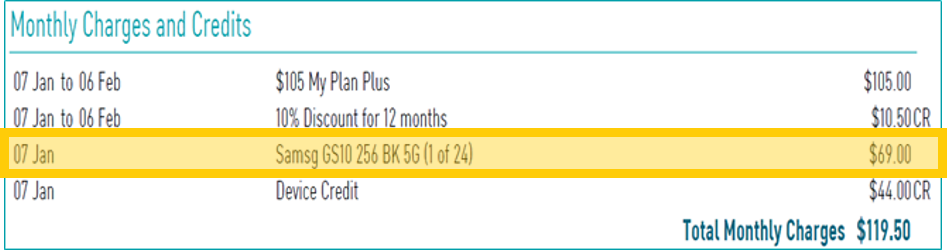
Below is an example of how device payment plans will appear on your bill under the Monthly Charges and Credits section. You can see the device payment amount for the month (e.g. $69.00), as well as how many payments have been made (1 of 24).

See this page for more help understanding your bill.


How to find your device payment plan on your Optus bill

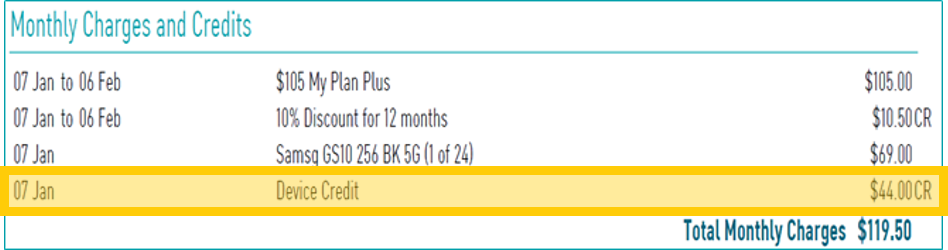
Customers on selected plans may be eligible to receive a device credit which reduces each monthly device repayment. This credit is applied separately on each monthly bill and offsets the cost of the device payment fee.

Below is an example of how device credits will appear on your bill under the Monthly Charges and Credits section. You can see the device credit amount for the month (e.g. $44.00 CR).


Where to find device credits on your Optus bill

FAQs

Changing to an eligible Optus SIM plan

If you move to another eligible Postpaid mobile phone plan, your device payments will remain the same.

Check your plan's Critical Information Summary (CIS) for more information about changing plans and any additional fees. Read more about changing Postpaid mobile phone plans here. For more information about changing your Home Internet plan, click here.

Cancelling or changing to an ineligible Optus SIM plan 


If you cancel your eligible Optus plan or move to an ineligible Optus plan, your will no longer be able to use OptusPay/your Device Payment Plan will be cancelled and , you'll need to pay out any remaining device payments in full. Any applicable device credits or discounts will be forfeited.


Refer to your plan critical information summary for more details.
If you're on an Optus Choice plan, you can upgrade your device at any time. You will need to pay out the amount remaining on your device in full. This is calculated by multiplying your monthly device payment by the number of months left on your plan.

You can also find out the cost of paying out your device in My Optus app by following the instructions here.

If your device is paid off, you'll no longer be charged device payments.

If you cancel your plan, you'll no longer be eligible for OptusPay/ a Device Payment Plan. This could be in addition to any applicable additional charges (including additional usage, early termination charges for your service, etc.).


Refer to your plan Critical Information Summary (CIS) for more details.

Related Articles

How to pay your bill

Your bill explained

How to change plans

Change ownership of your service

A guide to eSIM

Popular articles

Orders, deliveries & returns

How to check network status & outages

Home Internet WiFi username & password help

Home Internet troubleshooting

Get in touch

  • Get My Optus app
  • Contact us
  • Find a store

Need more help?


Getting started


Billing and recharge


Troubleshooting


Device Guides


5G Mobile


Broadband & NBN


Manage my account


Optus Sport


Email


5G Home Broadband


Entertainment


Coverage and travel


Home phone


Business


Consumer advice


More from Optus

  • My Optus App
  • SubHub
  • Accessories
  • Student Hub

Customer Service

  • Contact Us
  • Help & Support
  • Store Locator
  • Payment Assistance Policy
  • Feedback & Complaints
  • Report a service outage

About Us

  • About Optus
  • Careers
  • Corporate Information
  • Media Releases
  • About Singtel
  • Accessibility

  • Blog
  • Connect With Us on facebook
  • Connect With Us on instagram
  • Connect With Us on tiktok
  • Connect With Us on linkedin
  • Connect With Us on twitter
  • Connect With Us on youtube

  • Critical Information Summaries
  • Standard Agreement
  • Privacy, Security & Safety

Connect with us

  • Blog
  • Connect With Us on facebook
  • Connect With Us on instagram
  • Connect With Us on tiktok
  • Connect With Us on linkedin
  • Connect With Us on twitter
  • Connect With Us on youtube
  • Critical Information Summaries
  • Standard Agreement
  • Privacy, Security & Safety
© 2026 Singtel Optus Pty Limited
Optus acknowledges the Traditional Custodians of the lands, waters and skies across Australia. We pay our respects to Elders past and present and honour the strength and continuity of the world's oldest living cultures.