Skip to Primary NavigationSkip to ContentSkip to Footer
  • Personal
  • Business
  • Enterprise
  • Deals
  1. Help & Support - Optus/
  2. Articles/
  3. Messaging with Optus

Messaging with Optus

Messaging is a fast, convenient and easy way to get in touch with our customer service team.

Messaging is available in My Optus app and throughout optus.com.au, and it can be used at any time. Our Digital Assistant will greet you and ask you a few questions to make sure we put you in touch with a subject matter expert. Our experts will message you back with an answer to your query as soon as possible.

Unlike our previous Live Chat, your messaging history is kept for your reference so you can pick up the conversation where you left off. There is no need to repeat yourself or wait on hold, just be sure to log in. 

Messaging is:

  1. Fast
  2. Convenient
  3. Easy to use

You can use Messaging in My Optus app or at optus.com.au.
  1. Open My Optus app
  2. Log in using your My Account details
    1. If you're not registered yet, select Register in the app
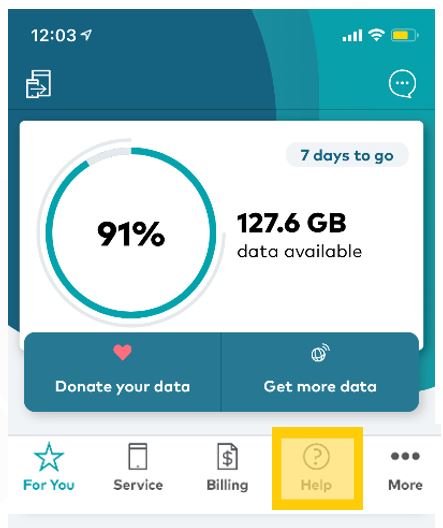
  3. Go to Help on the bottom menu
    Tap Help on the bottom of the screen

  4. Select Message Us
     Tap Message Us

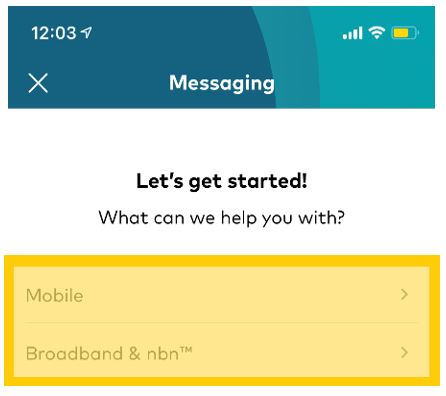
  5. Start your conversation with our Digital Assistant
    Start Conversation

Note: If you need to be connected to an expert, we encourage you to allow notifications from My Optus app so we can notify you when we have an answer to your question.

You can allow notifications on your device's settings or in My Optus app > More > App Settings.

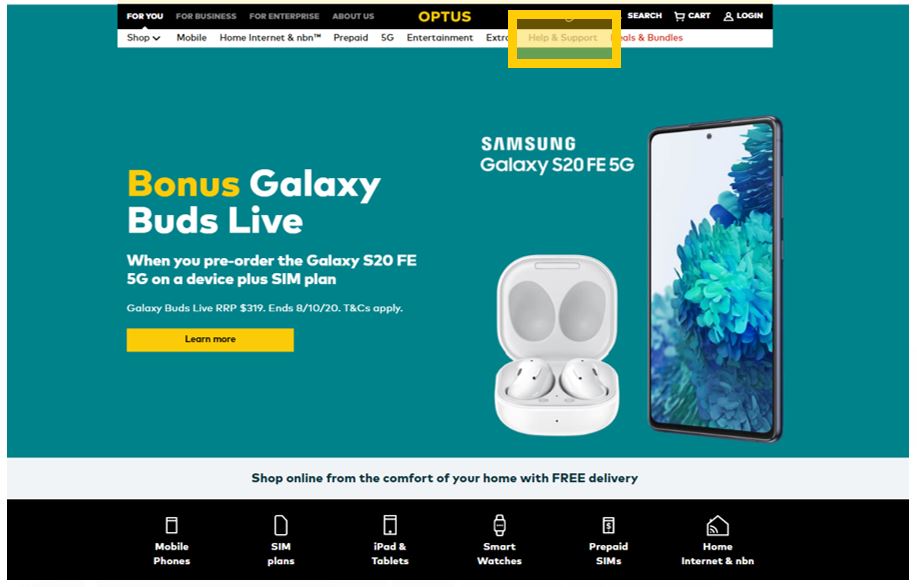
  1. Go to optus.com.au
  2. Select Help & Support in the main menu
    Select Help and Support

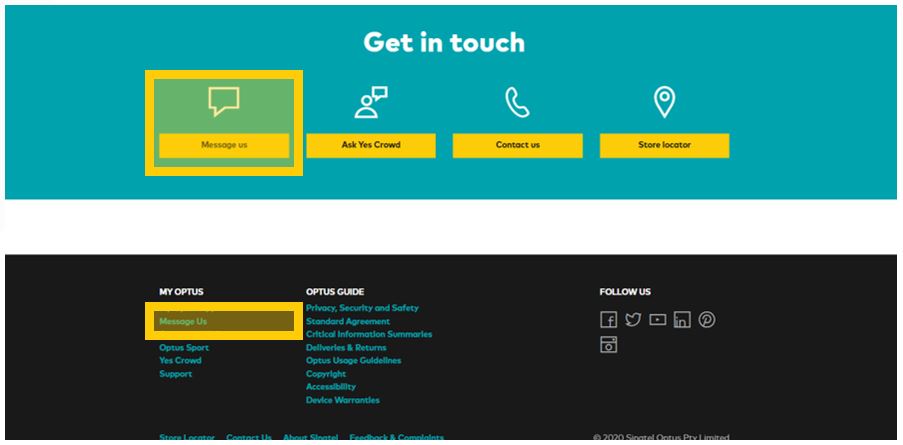
  3. Scroll down to the bottom of the page, and select Message us 
    Messaging on Comp Step 2 - Message Us

  4. Select Message us in My Account
  5. Log in using your My Account details

Alternatively, start your conversation by clicking on the Messaging bubble  Messaging Bubbleon the bottom right hand side of the page. 

Related Articles

How to pay your bill

How to change plans

Change ownership of your service

How to view your Optus bill

Home Internet WiFi username & password help

Popular articles

Orders, deliveries & returns

How to check network status & outages

Home Internet WiFi username & password help

Home Internet troubleshooting

Get in touch

  • Get My Optus app
  • Contact us
  • Find a store

Need more help?


Getting started


Billing and recharge


Troubleshooting


Device Guides


5G Mobile


Broadband & NBN


Manage my account


Optus Sport


Email


5G Home Broadband


Entertainment


Coverage and travel


Home phone


Business


Consumer advice


More from Optus

  • My Optus App
  • SubHub
  • Accessories
  • Student Hub

Customer Service

  • Contact Us
  • Help & Support
  • Store Locator
  • Payment Assistance Policy
  • Feedback & Complaints
  • Report a service outage

About Us

  • About Optus
  • Careers
  • Corporate Information
  • Media Releases
  • About Singtel
  • Accessibility

  • Blog
  • Connect With Us on facebook
  • Connect With Us on instagram
  • Connect With Us on tiktok
  • Connect With Us on linkedin
  • Connect With Us on twitter
  • Connect With Us on youtube

  • Critical Information Summaries
  • Standard Agreement
  • Privacy, Security & Safety

Connect with us

  • Blog
  • Connect With Us on facebook
  • Connect With Us on instagram
  • Connect With Us on tiktok
  • Connect With Us on linkedin
  • Connect With Us on twitter
  • Connect With Us on youtube
  • Critical Information Summaries
  • Standard Agreement
  • Privacy, Security & Safety
© 2026 Singtel Optus Pty Limited
Optus acknowledges the Traditional Custodians of the lands, waters and skies across Australia. We pay our respects to Elders past and present and honour the strength and continuity of the world's oldest living cultures.