Skip to Primary NavigationSkip to ContentSkip to Footer
  • Personal
  • Business
  • Enterprise
  • Deals
  1. Help & Support - Optus/
  2. Articles/
  3. Internet security: Spam, spyware & viruses

Internet security: Spam, spyware & viruses

This page contains detailed info about commonly experienced threats to your online security & safety. Also, be sure to read our companion article on identifying and reporting fake websites, hoax emails and phishing.

For further information on internet security, please visit the ACMA internet security website.
Spam is unwanted and/or unsolicited junk email that can be potentially harmful to your computer/device. Spam filters are designed to protect you from receiving unwanted or unsolicited email by checking the message as it arrives in your mailbox and moving it to a separate Spam folder. Opening spam or clicking on links within spam email may also make you more vulnerable to 'phishing'.

Did Optus send me this email?

Always keep in mind, Optus does not send unsolicited emails to ask for sensitive or personal information. If you've received an email that's asking for private information we encourage you to report it to us.

How can I limit spam?

Your OptusNet email accounts come with free automatic spam filtering so you don't need to do a thing! The spam filter checks your incoming emails and if they've been identified as spam, they will be moved to a separate spam folder.

You'll find the spam folder listed with your other mail folders when viewing your OptusNet email account. Be sure to periodically check the contents of your spam folder to ensure that the filtering process has not moved a message that is not spam into that folder.

Any email remaining in the spam folder after 14 days is automatically deleted.

How do I report spam?

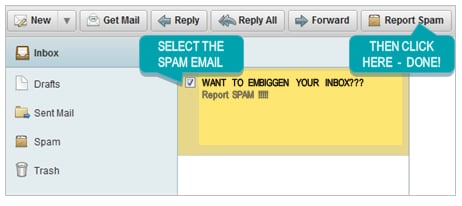
You can report spam by following the steps below.

Using OptusNet Webmail simply select the email and click the 'Report Spam' button. This will move the email to your Spam folder and also report the email through to the OptusNet anti-spam system.

246bb1e7-9846-4722-aa2f-95555e78209d.png

The 'Report Spam' button is available in all folders except the Spam folder.  The more spam you mark, the better our system gets at detecting these messages.

Back to Top

A computer virus is a program or piece of malicious code that spreads between PCs and other devices. They can have many negative effects on your computer/device.

How can I limit this threat?

An up to date anti-virus program or security suite can minimise the possibility of your computer/mobile device from becoming infected. Further info and solutions are available in this article.

Back to Top

Worms are viruses that reside in the active memory of a computer and duplicate themselves. They may send copies of themselves to other computers, such as through email or through instant messaging programs.

How do I guard against worms?

An up to date anti-virus program or security suite can minimise the possibility of your computer/mobile device from falling victim to this online danger. Further info and solutions are available in this article or refer to the section How Do I Stay Safe and Secure Online to start your journey in finding a suitable Security Software Provider.

Back to Top

A trojan is a malicious program that pretends to be a benign application; that purposefully does something the user does not expect. Trojans are not viruses since they don't replicate but they can be just as destructive.

What can I do?

Please refer to the section How Do I Stay Safe and Secure Online to start your journey in finding a suitable security software provider. We also have more info on how you stay safe online.

Back to Top

Adware also known as Adbots, profile your surfing and spending habits and can pop up annoying ad windows.

Spyware also known as Malware covertly gathers user information and activity without their knowledge. This can include monitoring your keystrokes, passwords, credit card numbers, sensitive information, where you surf, chat sessions and can even take random screen shots of your activity.

Basically, whatever you do on the computer is completely visible to the spy. You don't even have to be connected to the internet to be spied upon.

The latest permutations of spyware include the use of routines to mail out user activity via e-mail or posting information to the web where the spy can view it at their leisure. Spyware can also use "stealth routines" and "polymorphic" (meaning to change) techniques to avoid detection and removal by popular anti-spy software.

In some cases spyware can even counter-attack anti-spy packages by attempting to disable the program. Some variations are even able to reinstall themselves after being removed.

How do I stop spyware/adware?

There are many spyware stopping software packages available. Please refer to the section How Do I Stay Safe and Secure Online to start your journey in finding a suitable security software provider. We also have more info on how you can stay safe online.

Back to Top

A denial of service attack is a flood of information which swamps internet equipment and slows traffic down drastically.

How do I minimise this threat?

A properly setup firewall can help to protect you from a DoS event. See this article for more information about firewalls and protecting yourself online.

Back to Top

Related Articles

How to pay your bill

How to request more time to pay your bill

How to view your Optus bill

How to unlock your mobile device from the Optus network

A guide to eSIM

Popular articles

Orders, deliveries & returns

How to check network status & outages

Home Internet WiFi username & password help

Home Internet troubleshooting

Get in touch

  • Get My Optus app
  • Contact us
  • Find a store

Need more help?


Getting started


Billing and recharge


Troubleshooting


Device Guides


5G Mobile


Broadband & NBN


Manage my account


Optus Sport


Email


5G Home Broadband


Entertainment


Coverage and travel


Home phone


Business


Consumer advice


More from Optus

  • My Optus App
  • SubHub
  • Accessories
  • Student Hub

Customer Service

  • Contact Us
  • Help & Support
  • Store Locator
  • Payment Assistance Policy
  • Feedback & Complaints
  • Report a service outage

About Us

  • About Optus
  • Careers
  • Corporate Information
  • Media Releases
  • About Singtel
  • Accessibility

  • Blog
  • Connect With Us on facebook
  • Connect With Us on instagram
  • Connect With Us on tiktok
  • Connect With Us on linkedin
  • Connect With Us on twitter
  • Connect With Us on youtube

  • Critical Information Summaries
  • Standard Agreement
  • Privacy, Security & Safety

Connect with us

  • Blog
  • Connect With Us on facebook
  • Connect With Us on instagram
  • Connect With Us on tiktok
  • Connect With Us on linkedin
  • Connect With Us on twitter
  • Connect With Us on youtube
  • Critical Information Summaries
  • Standard Agreement
  • Privacy, Security & Safety
© 2026 Singtel Optus Pty Limited
Optus acknowledges the Traditional Custodians of the lands, waters and skies across Australia. We pay our respects to Elders past and present and honour the strength and continuity of the world's oldest living cultures.