Skip to Primary NavigationSkip to ContentSkip to Footer
  • Personal
  • Business
  • Enterprise
  • Deals

It's faster on the app

Manage your account. Get 24/7 tech support. Shop our best deals.
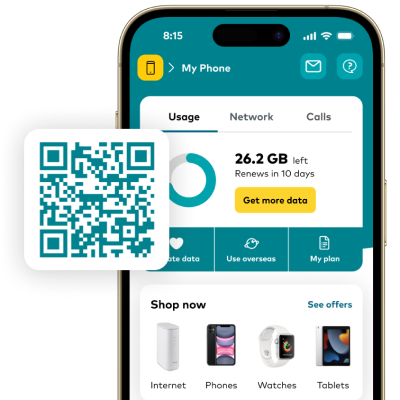

Get the app on App StoreGet the app on Google Play

Do more in minutes

4.5 App Store Rating

Manage your account

All your Optus mobile and internet services together in one place, so you can take control of your usage and stay on top of your payments.

Get 24/7 tech support in My Optus App

Need help? You’re just a few taps away from getting your questions answered, with tech support available around the clock.

Shop our best offers

Find the latest deals, offers and savings plus checkout with Optus Pay interest free and enjoy free express delivery.

Power their potential

By donating a little of your extra data you could provide much needed internet access to young people and people doing it tough.

FAQs

What is My Optus app?

The My Optus app is a self-serve tool that allows you to manage your Optus account on-the-go. You can make payments, check your usage, change account settings, message us and more.

What can I do in My Optus app? 

You can use the My Optus app to self-manage your Optus account, including:

Make account payments
Set up direct debit payments
Choose how you receive your invoices
Check your usage
Find your contract details
Update your personal details

Find more ways to manage your account in the My Optus app.

If you need more help, you can also send us a message in the My Optus app (opens in a new tab).

Is My Optus app secure?

Yes. My Optus app uses best practice encryption methods when transmitting sensitive information. Any sensitive data is stored locally on your device, which is a good reason to ensure you secure your device with a strong password / PIN.

Is my device compatible?

My Optus app is available on iPhone, iPad, and iPod touch using iOS 14.0 or later, and most Android mobile phones using Android OS 10.0 or later.

Can I access My Optus app as a business customer?

My Optus app is available to business customers on an Optus business plan.

You can manage some business plans through My Optus app including mobile, data, Postpaid plans, and Optus Loop. Note that credit details will not be displayed for Business Fund and Tech Fund plans.

How do I update my contact details?

You can change your contact phone number, email address, postal address, My Account password and payment details within My Optus app. Go to the Account tab and select the card with your name on it to update your details. How to update your personal details (opens in a new tab).

How do I find my account payment?

Finding your account payment is easy within My Optus app. Simply head to the 'Billing' or 'Payments' tab and select 'View bill' or 'Payment history'. You can also download a pdf version of your Bill or Invoice from there.

How do I request a service Change of Ownership?

If you require a change of ownership of your service, please message us 24/7 directly within My Optus app. See some useful links below:
Bereavement Care Support
Change of ownership timeframes
Change of ownership impacts

How do I contact Optus?

We’re here to help 24/7 through our Messaging service, available in the My Optus app. Get quick responses from our Digital Assistant, connected to our Optus experts who can provide you with a solution as quickly as possible, or access your messaging log.

Can I track my order in My Optus app?

Yes. You can easily track the progress of your order in My Optus app. Please note that you will need your order number on hand. For more instructions, read How to track your mobile order.

How do I log in to My Optus app?

Logging into the My Optus app is simple using your My Account email and password. For help, see Optus account login and password help. For detailed steps, read My Optus app.

How do I upgrade my device?

Ready to upgrade? Chat to one of our Optus experts in My Optus app via our Messaging service and we’ll help you with this request.

Can I shop and make purchases through My Optus app?

Yes. You can now shop straight within My Optus app, with the added benefit of free delivery on all phones and SIMs. Browse our full range of products, track orders and get the latest deals and discounts.

What are the terms and conditions of using My Optus app?

  • The app is free to download and use for Optus Mobile customers on selected plans, however some data charges may apply in certain circumstances.
  • If you are travelling overseas, you will incur roaming data charges when using the app. Please check optus.com.au/travel for latest roaming offers.
  • The Optus Fair Go Policy applies to your use of the app.
  • The app includes Network Pulse, which provides you with details of your connection status and history.

Our Agreement

  1. Optus Mobile Pty Ltd (ABN 65 054 365 696) and Optus Networks Pty Ltd (ABN 92 008 570 330) (together, Optus, we, us) grant the individual using the app (you, your) a licence to use the app for your personal, non-commercial purposes on your mobile device on the terms and conditions set out in this agreement. This licence is revocable and non-transferable and does not transfer any rights in the app to you. Any upgrade or new release of the app is subject to this agreement, as updated from time to time in our discretion.
  2. You will not, nor permit others to: (a) use the app for any unlawful or illegal activity; (b) use the app in a way that is contrary to this agreement or is not in good faith, (c) attempt to copy, modify, reverse engineer, decompile, disassemble, or extract any element of any source code, algorithms, methods or techniques embodied in the app; or (d) attempt to circumvent or modify any security technologies included in the app. Applicable Optus privacy and security policies apply.
  3. Your usual data charges will apply to download and use the app. If you are roaming overseas, data used when using the app will be charged at the applicable roaming rate. Check optus.com.au/travel for rates.
  4. Not all features and functionality of the app will work for all customers.
  5. If you are using a supported Optus supplied modem, you may be able to access your modem information through the app using the supplied modem username and password. This will allow you to restart your modem, access enhanced features and manage the WiFi details and connected devices.
  6. For Optus mobile customers, you may be able to view information about your mobile usage in the app. This information isn't generated in real-time. Typically, mobile usage info is updated within 24 hours. You may also be able to see a description of your plan inclusions in the app - we've tried to make those descriptions as simple as possible, but for an authoritative source please refer to the Optus Standard Agreement.
  7. We may send you in-app messages and push notifications relating to the operation of the app or your use of it, your agreements or services with Optus, and related offers. You can turn these notifications off in settings in your device or the app.
  8. We collect and use personal information to deliver services and information in the app, to understand your experience with it and how we can improve it, and to provide notices or updates to you. We also keep and access records of conversations with our customer service reps via the chat function. Further information about how Optus handles your personal information is outlined in our Privacy Policy.
  9. We use your device's location even when you're not using the app, to send geo-relevant notifications and to provide information for the operation of Network Pulse. We also use location information to recommend data roaming packs when you're travelling overseas to help prevent excess data charges. You can turn of geo-relevant notifications by turning off location services in your device's settings.
  10. You acknowledge that the app collects and makes use of information about location and your use of your mobile service Performance Information from your mobile device and from the mobile network or any WiFi network being utilised by your mobile device. You consent to Optus' use of the Performance Information as part of your use of the app. Optus uses this Performance Information to optimise and continually improve performance of Optus' mobile network. If you do not want Optus to collect the Performance Information or to use it for these purposes, you can switch it off anytime by unticking the checkbox in App Settings > Network Performance.
  11. Data charges may apply to use of Network Pulse beyond the Optus network. You acknowledge that Network Pulse also collects and makes use of information about location and your use of your mobile service from your mobile device and from the mobile network or any WiFi network being utilised by your mobile device. You consent to Optus' use of this information as part of your use of this app. Network Pulse uses this information for conducting periodic network speed tests, and to optimise and continually improve performance of Optus' mobile network and your experience. We rely on third party software powered by Ookla LLC for conducting speed tests in Network Pulse, and do not provide any warranties about the accuracy of the results. If you do not want Network Pulse or to use it for the purposes outlined here, you can switch it off anytime by unticking 'Display Network Pulse' located under Account Security and Settings.
  12. This app uses Apple Maps features and content. Optus, and not Apple, is otherwise responsible for this app and its contents.
  13. During the course of using the app, data will be sent to Google Analytics in the background. This is used for analytics purposes only and allows us to continually improve the app and services available to you. This process will use a negligible amount of your data allowance (typically less than 10 Kilobytes (kB) each time the app is used) and will appear on your data usage statement.
  14. We use industry standard security measures to keep the app secure, but we can't guarantee it's impervious to all attacks. It's also important that you keep your device secure and your passwords secret.
  15. To the extent permitted by law, we do not represent, warrant or guarantee the suitability, completeness, accuracy or currency of any information or content accessed via the app, or that the app will be uninterrupted, timely, error-free, free of viruses, intrusion or other harmful components.
  16. We may change, add or remove parts of this agreement or the app at any time. We'll notify you about major changes. If you don't agree with those changes, you should delete the app. By continuing to use the app after a change, you are indicating your acceptance of those changes.
  17. We may terminate this agreement and cease providing the app (or any part of it) at any time in our discretion without notice. You may cease using or remove the app from your device at any time without notice to us. In order to use My Optus App, you must agree to our terms & conditions.

More from Optus

  • My Optus App
  • SubHub
  • Accessories
  • Student Hub

Customer Service

  • Contact Us
  • Help & Support
  • Store Locator
  • Payment Assistance Policy
  • Feedback & Complaints
  • Report a service outage

About Us

  • About Optus
  • Careers
  • Corporate Information
  • Media Releases
  • About Singtel
  • Accessibility

  • Blog
  • Connect With Us on facebook
  • Connect With Us on instagram
  • Connect With Us on tiktok
  • Connect With Us on linkedin
  • Connect With Us on twitter
  • Connect With Us on youtube

  • Critical Information Summaries
  • Standard Agreement
  • Privacy, Security & Safety

Connect with us

  • Blog
  • Connect With Us on facebook
  • Connect With Us on instagram
  • Connect With Us on tiktok
  • Connect With Us on linkedin
  • Connect With Us on twitter
  • Connect With Us on youtube
  • Critical Information Summaries
  • Standard Agreement
  • Privacy, Security & Safety
© 2026 Singtel Optus Pty Limited
Optus acknowledges the Traditional Custodians of the lands, waters and skies across Australia. We pay our respects to Elders past and present and honour the strength and continuity of the world's oldest living cultures.