Skip to Primary NavigationSkip to ContentSkip to Footer
  • Personal
  • Business
  • Enterprise
  • Deals
  1. Smartwatches>
  2. Apple>
  3. Apple Watch Series 10
Free Delivery
Interest Free Payment Options
Data Sharing
Our Network

Choose your watch & payment terms

Image gallery of Apple Watch Series 10
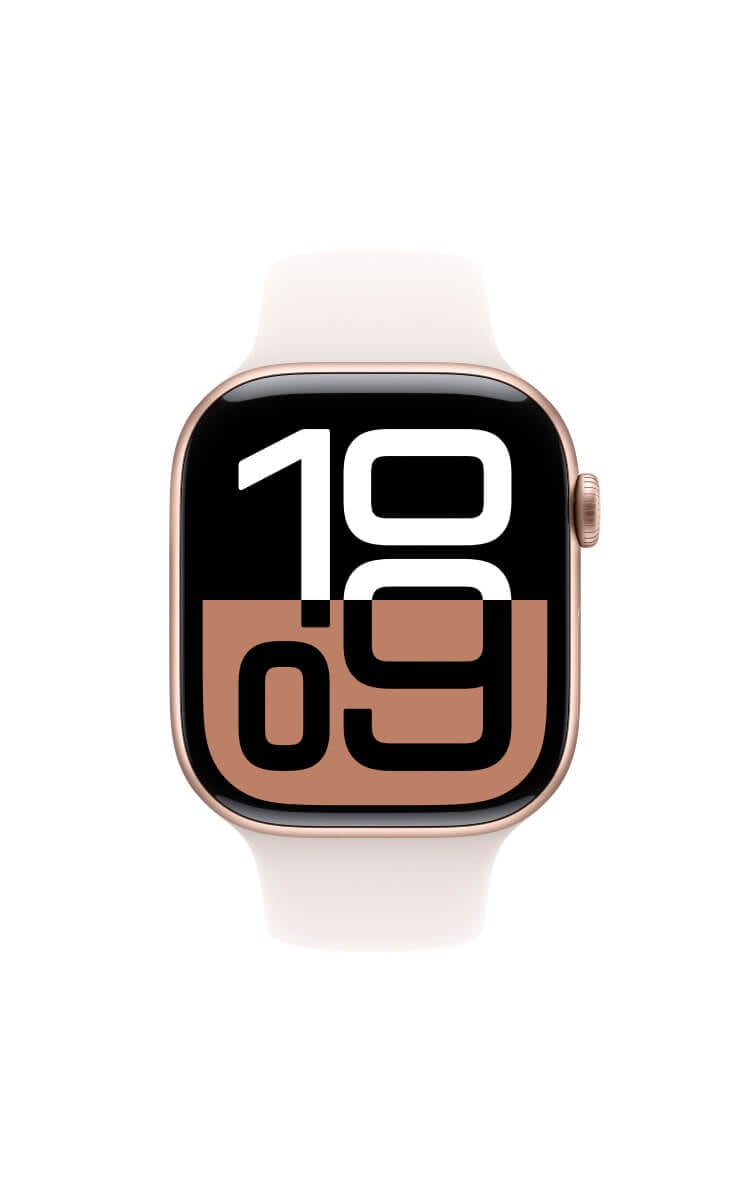
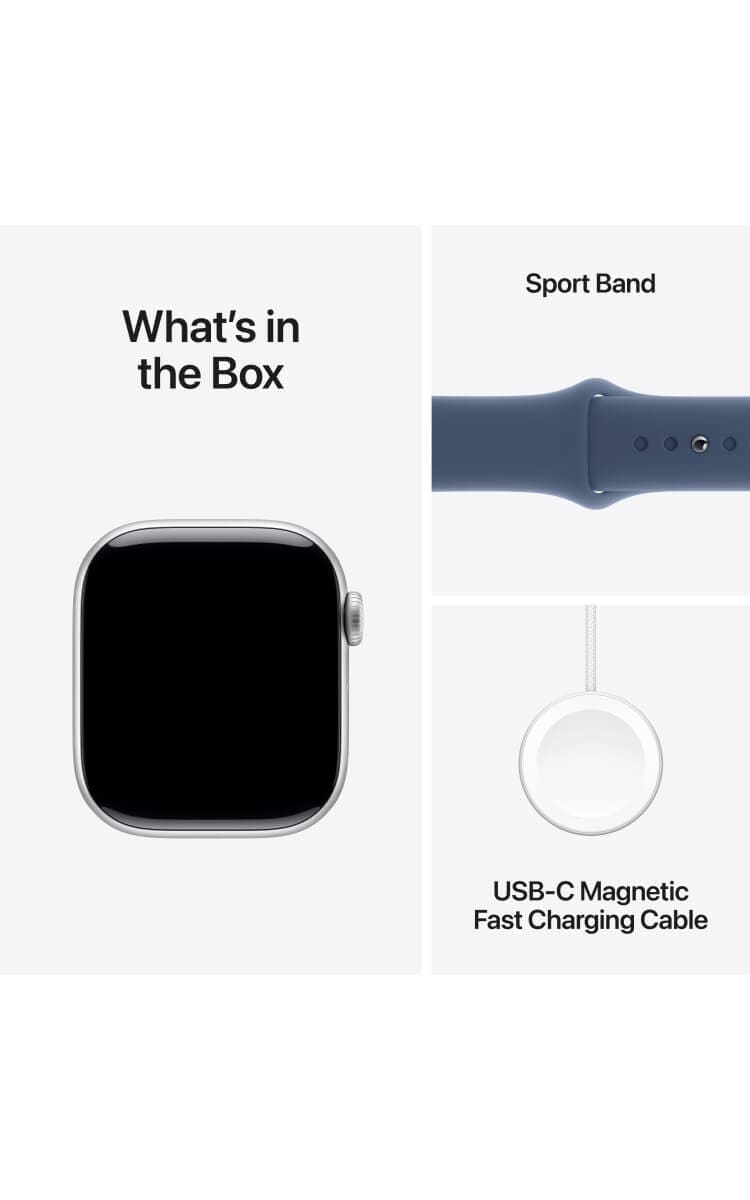
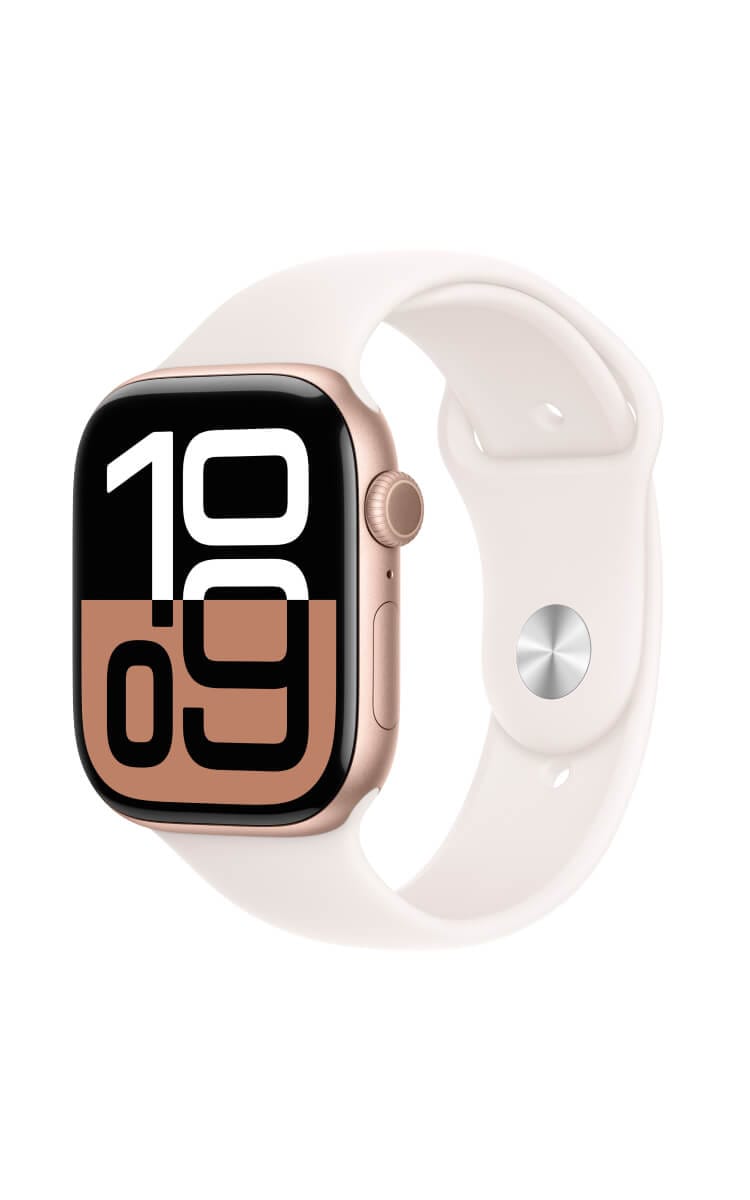
Apple Watch Series 10 in Silver Aluminium with a Sport Band in Denim, shown at an angle displaying a bold digital clock face.Apple Watch Series 10 in Silver Aluminium with a Sport Band in Denim, front-facing view displaying a bold digital clock face.Apple Watch Series 10 in Silver Aluminium highlighting key features: thinner design, bigger display, up to 80% charge in about 30 minutes, and sleep tracking with overnight health metrics.Apple Watch Series 10 in Silver Aluminium with a Sport Band in Denim showing workout and activity tracking with sensors for water sports, displaying activity rings and a swim workout summary.What's in the box for Apple Watch Series 10 in Silver Aluminium: the watch, a Sport Band in Denim, and a USB-C Magnetic Fast Charging Cable.Apple Watch Series 10 in Rose Gold with a Sport Band in Light Blush, shown at an angle displaying a bold digital clock face.Apple Watch Series 10 in Rose Gold with a Sport Band in Light Blush, front-facing view displaying a bold digital clock face.Apple Watch Series 10 in Rose Gold highlighting key features: thinner design, bigger display, up to 80% charge in about 30 minutes, and sleep tracking with overnight health metrics.Apple Watch Series 10 in Rose Gold with a Sport Band in Light Blush showing workout and activity tracking with sensors for water sports, displaying activity rings and a swim workout summary.What's in the box for Apple Watch Series 10 in Rose Gold: the watch, a Sport Band in Light Blush, and a USB-C Magnetic Fast Charging Cable.Apple Watch Series 10 in Jet Black with a Sport Band in Black, shown at an angle displaying a bold digital clock face.Apple Watch Series 10 in Jet Black with a Sport Band in Black, front-facing view displaying a bold digital clock face.Apple Watch Series 10 in Jet Black highlighting key features: thinner design, bigger display, up to 80% charge in about 30 minutes, and sleep tracking with overnight health metrics.Apple Watch Series 10 in Jet Black with a Sport Band in Black showing workout and activity tracking with sensors for water sports, displaying activity rings and a swim workout summary.What's in the box for Apple Watch Series 10 in Jet Black: the watch, a Sport Band in Black, and a USB-C Magnetic Fast Charging Cable.Apple Watch Series 10 in Jet Black with an Ink Sport Loop, shown at an angle displaying a bold digital clock faceApple Watch Series 10 in Jet Black with a Sport Loop band in Ink, front-facing view displaying a bold digital clock face.Apple Watch Series 10 in Jet Black highlighting key features: thinner design, bigger display, up to 80% charge in about 30 minutes, and sleep tracking with overnight health metrics.Apple Watch Series 10 in Jet Black with a Sport Loop band in Ink showing workout and activity tracking with sensors for water sports, displaying activity rings and a swim workout summary.What's in the box for Apple Watch Series 10 in Jet Black: the watch, a Sport Loop band in Ink, and a USB-C Magnetic Fast Charging Cable.
Current image - Apple Watch Series 10 in Silver Aluminium with a Sport Band in Denim, shown at an angle displaying a bold digital clock face.
Apple

Watch Series 10

Your new watch

Choose your model: 46mm
Choose your colour:
Rose Gold

Customise your band

Choose your band: Sport Band
Choose your band size:
M/L
Choose your band colour:
Light Blush

All payments are interest free

In Stock FREE express delivery or collect in store. Learn more
$23.86/month
Select Watch

Features | Specifications


  • Get phone notifications direct to your smartwatch with Optus Number Share.
  • Track your physical activity and personal fitness goals while you're out and about.
  • Activate your smartwatch digital wallet and make payments on-the-go.

Also available: Apple Watch Ultra2

Choose your Plan

1GB
$10/month

Choice Plus Watch Plan

  • Plan inclusions:

  • Pair your phone with Number Share

  • Data-sharing across eligible plans

  • No excess data charges

  • No lock-in contract

  • Entertainment add ons:

  • Save up to 10% on subscriptions every month

  • Netflix, Amazon Prime, Paramount+, Kayo Sports, Binge, YouTube Premium and more

All for use within Australia

Critical Information Summary (PDF)

You've selected

Apple Watch Series 10
46mm,Rose Gold - 36 months
$23.86/month

Add a plan to proceed

Total

$23.86/month

Minimum cost $858.96. Includes device payments over 36 months and one month of your chosen plan fees.

Network Icon

Check out our Network Coverage available at your residential address and other critical locations before completing this order.

Why Optus?

Free delivery

Shop online and get free delivery nation-wide.

Network

Our combined 4G and 5G network covers 98.5% of Australians, and our 5G network is progressively rolling out. Check coverage.

Number Share

Share one mobile number between eligible devices. Enjoy the ease of taking your smart watch while leaving your phone behind.
FEATURES
Apple Watch Series 10 is a big-time upgrade. Now featuring a thinner, lighter design and a bigger, brighter display. A Thinstant Classic.
Apple Watch Series 10 offers a bigger display with more screen area.
Apple Watch Series 10 has a thinner and lighter design that's more comfortable.
Apple Watch Series 10 comes in stunning finishes including Jet Black aluminium and polished titanium.
Apple Watch Series 10 provides health insights, day and night. Including tracking your heart rate and sleep stages.
Apple Watch Series 10 can help in an emergency if you fall or are in a car crash. Now with Medical ID, Compass Backtrack and Emergency Call functionality. Apple Watch Series 10 faster charging gives you 80% battery in about 30 minutes.
Apple Fitness+ offers fitness for all and personalised just for you, with 12 different workout types from HIIT, Yoga and Meditation. Get real-time, personalised metrics on screen with Apple Watch.
Apple Watch Series 10 is a big-time upgrade. Now featuring a thinner, lighter design and a bigger, brighter display. A Thinstant Classic.
Apple Watch Series 10 offers a bigger display with more screen area.
Apple Watch Series 10 has a thinner and lighter design that's more comfortable.
Apple Watch Series 10 comes in stunning finishes including Jet Black aluminium and polished titanium.
Apple Watch Series 10 with a carrier plan let's you call, text and stream music, even when you don't have your iPhone nearby.
Apple Watch Series 10 provides health insights, day and night. Including tracking your heart rate and sleep stages.
You can track all your activity and workouts with Apple Watch Series 10. Now with depth and water temperature for all activities like swimming.
Apple Watch Series 10 can help in an emergency if you fall or are in a car crash. Now with Medical ID, Compass Backtrack and Emergency Call functionality.
Apple Watch Series 10 faster charging gives you 80% battery in about 30 minutes.
Apple Fitness+ offers fitness for all and personalised just for you, with 12 different workout types from HIIT, Yoga and Meditation. Get real-time, personalised metrics on screen with Apple Watch.


◊ Legal Disclaimers

Optus is relying on product information supplied by Apple in making the representations above and below. Your rights and guarantees under the Australian Consumer Law are unaffected.

Display and Design: Compared to previous generations.

Mobile and Wireless: Carrier plan required for cellular service. Contact your service provider for more details. Connection may vary based on network availability. International roaming is not supported. Check apple.com/au/watch/cellular for participating carriers and eligibility. See https://support.apple.com/en-au/119601 for additional setup instructions.

Coverage, compatible watch, phone and eligible plans required for Optus Number Share.

Emergency SOS: Emergency SOS requires a mobile network connection or Wi-Fi calling with an internet connection from your Apple Watch or nearby iPhone.

Fast Charging: Charge times are from 0 to 80 per cent and 0 to 100 per cent using the included Apple Watch Magnetic Fast Charger to USB-C Cable. Testing conducted by Apple in August 2024 using preproduction Apple Watch Series 10 (GPS) and Apple Watch Series 10 (GPS + Cellular), each paired with an iPhone; all devices tested with prerelease software, Apple Watch Magnetic Fast Charger to USB-C Cable (Model A2515) and Apple 20W USB-C Power Adapter (Model A2305). Fast-charge testing conducted with drained Apple Watch units. Times measured from the appearance of the Apple logo as the unit started up. Charge time varies with region, settings and environmental factors; actual results will vary.

Up to 40% Brighter: When angled away from the user.

ECG: The ECG app is available on Apple Watch Series 4 and later (excluding Apple Watch SE) and can generate an ECG similar to a single-lead electrocardiogram. Intended for use by people 22 years old and over.

IRN (Irregular Rhythm Notification): Irregular rhythm notification requires the latest version of watchOS and iOS. It is not intended for use by people under 22 years old or those who have been previously diagnosed with atrial fibrillation. Always follow instructions for use. The device is not intended to replace traditional methods of diagnosis. Consult a doctor if atrial fibrillation is detected or if you have symptoms of a heart attack, stroke or other cardiovascular conditions.

Blood Oxygen: The Blood Oxygen app is for wellness purposes only and not for medical use.

Vitals: The Vitals app is for wellness purposes only and not for medical use.

Temperature Sensing: The temperature sensing feature is not intended for medical use. Temperature sensing is available only on Apple Watch Series 8 and later and all Apple Watch Ultra models.

Cycle Tracking: The Cycle Tracking app should not be used for birth control or to diagnose a health condition. International Emergency Calling: Requires Apple Watch Series 7, SE, Ultra or later. For a list of supported countries and regions, see apple.com/au/watchos/feature-availability.

Water and Dust Resistance: Apple Watch SE and Apple Watch Series 10 have a water resistance rating of 50 metres under ISO standard 22810:2010, and may be used for shallow-water activities like swimming in a pool or ocean. Series 10 can also be used for snorkelling to 6 metres. They should not be used for scuba diving or waterskiing, or other activities involving high-velocity water or submersion below shallow depth. Apple Watch Ultra 2 has a water resistance rating of 100 metres under ISO standard 22810:2010. It may be used for recreational scuba diving (with a compatible third-party app from the App Store) to 40 metres, and high-speed water sports. It should not be used for diving below 40 metres.

Water resistance is not a permanent condition and can diminish over time. For additional information, see support.apple.com/en-au/HT205000. Apple Watch Series 10 and Apple Watch Ultra 2 are also rated IP6X dust-resistant.

Gestures: Requires Apple Watch Ultra 2 or Series 9 or later.

Precision Finding for iPhone: Requires an iPhone and Apple Watch with second-generation Ultra Wideband chip.

Power and Battery: Battery life varies by use and configuration; see apple.com/au/watch/battery for more information.

Carbon Neutral: Learn more at apple.com/au/2030.

Apple Fitness+: Apple Fitness+ requires a subscription.

Bands: Bands for illustrative purposes and subject to availability. Some bands are sold separately.

Compatibility: Apple Watch requires iPhone XS or later with the latest iOS version.

Feature Availability: Features subject to change. Some features, applications and services may not be available in all regions or all languages.

See apple.com/au/watchos/feature-availability for complete list.

Apple Watch For Your Kids: Not all features will be available if the Apple Watch is set up through Apple Watch For Your Kids. Carrier plan required for cellular service. Contact your service provider for more details. International roaming is not supported. Check apple.com/au/watch/cellular for participating carriers and eligibility.

Check In: Check In requires watchOS 11 or later for the sender, and iOS 17 or later for the recipient. Location sharing is not supported in South Korea and might be unavailable in other regions due to local laws.

Coverage availability varies depending on your device and location. Check coverage at optus.com.au/coverage.

Fast charger sold separately.
SPECIFICATIONS
Compare which Apple Watch is right for you. Apple Watch Ultra 2 is the ultimate sports and adventure watch. Apple Watch Series 10 has the biggest display and thinnest design. And Apple Watch SE is heavy on features but light on price.


◊ Legal Disclaimers

Optus is relying on product information supplied by Apple in making the representations above and below. Your rights and guarantees under the Australian Consumer Law are unaffected.

Display and Design: Compared to previous generations.

Mobile and Wireless: Carrier plan required for cellular service. Contact your service provider for more details. Connection may vary based on network availability. International roaming is not supported. Check apple.com/au/watch/cellular for participating carriers and eligibility. See https://support.apple.com/en-au/119601 for additional setup instructions.

Emergency SOS: Emergency SOS requires a mobile network connection or Wi-Fi calling with an internet connection from your Apple Watch or nearby iPhone.

Fast Charging: Charge times are from 0 to 80 per cent and 0 to 100 per cent using the included Apple Watch Magnetic Fast Charger to USB-C Cable. Testing conducted by Apple in August 2024 using preproduction Apple Watch Series 10 (GPS) and Apple Watch Series 10 (GPS + Cellular), each paired with an iPhone; all devices tested with prerelease software, Apple Watch Magnetic Fast Charger to USB-C Cable (Model A2515) and Apple 20W USB-C Power Adapter (Model A2305). Fast-charge testing conducted with drained Apple Watch units. Times measured from the appearance of the Apple logo as the unit started up. Charge time varies with region, settings and environmental factors; actual results will vary.

Up to 40% Brighter: When angled away from the user.

ECG: The ECG app is available on Apple Watch Series 4 and later (excluding Apple Watch SE) and can generate an ECG similar to a single-lead electrocardiogram. Intended for use by people 22 years old and over.

IRN (Irregular Rhythm Notification): Irregular rhythm notification requires the latest version of watchOS and iOS. It is not intended for use by people under 22 years old or those who have been previously diagnosed with atrial fibrillation. Always follow instructions for use. The device is not intended to replace traditional methods of diagnosis. Consult a doctor if atrial fibrillation is detected or if you have symptoms of a heart attack, stroke or other cardiovascular conditions.

Blood Oxygen: The Blood Oxygen app is for wellness purposes only and not for medical use.

Vitals: The Vitals app is for wellness purposes only and not for medical use.

Temperature Sensing: The temperature sensing feature is not intended for medical use. Temperature sensing is available only on Apple Watch Series 8 and later and all Apple Watch Ultra models.

Cycle Tracking: The Cycle Tracking app should not be used for birth control or to diagnose a health condition. International Emergency Calling: Requires Apple Watch Series 7, SE, Ultra or later. For a list of supported countries and regions, see apple.com/au/watchos/feature-availability.

Water and Dust Resistance: Apple Watch SE and Apple Watch Series 10 have a water resistance rating of 50 metres under ISO standard 22810:2010, and may be used for shallow-water activities like swimming in a pool or ocean. Series 10 can also be used for snorkelling to 6 metres. They should not be used for scuba diving or waterskiing, or other activities involving high-velocity water or submersion below shallow depth. Apple Watch Ultra 2 has a water resistance rating of 100 metres under ISO standard 22810:2010. It may be used for recreational scuba diving (with a compatible third-party app from the App Store) to 40 metres, and high-speed water sports. It should not be used for diving below 40 metres.

Water resistance is not a permanent condition and can diminish over time. For additional information, see support.apple.com/en-au/HT205000. Apple Watch Series 10 and Apple Watch Ultra 2 are also rated IP6X dust-resistant.

Gestures: Requires Apple Watch Ultra 2 or Series 9 or later.

Precision Finding for iPhone: Requires an iPhone and Apple Watch with second-generation Ultra Wideband chip.

Power and Battery: Battery life varies by use and configuration; see apple.com/au/watch/battery for more information.

Carbon Neutral: Learn more at apple.com/au/2030.

Apple Fitness+: Apple Fitness+ requires a subscription.

Bands: Bands for illustrative purposes and subject to availability. Some bands are sold separately.

Compatibility: Apple Watch requires iPhone XS or later with the latest iOS version.

Feature Availability: Features subject to change. Some features, applications and services may not be available in all regions or all languages.

See apple.com/au/watchos/feature-availability for complete list.

Apple Watch For Your Kids: Not all features will be available if the Apple Watch is set up through Apple Watch For Your Kids. Carrier plan required for cellular service. Contact your service provider for more details. International roaming is not supported. Check apple.com/au/watch/cellular for participating carriers and eligibility.

Check In: Check In requires watchOS 11 or later for the sender, and iOS 17 or later for the recipient. Location sharing is not supported in South Korea and might be unavailable in other regions due to local laws.

Coverage availability varies depending on your device and location. Check coverage at optus.com.au/coverage.

Fast charger sold separately.
TERMS AND CONDITIONS

Fair Go Policy applies.

How we calculate total minimum cost:

Your min. cost is the minimum total amount you will be required to pay, when you sign up to a SIM plan or a SIM plan with a device payment plan.

  • When you sign up to a month to month SIM plan without a device payment plan, your min. cost is one month of your SIM plan fee.
  • When you sign up to a month to month SIM plan (which includes a plan fee discount) without a device payment plan, your min. cost is one month of your discounted SIM plan fee.
  • When you sign up to a month to month SIM plan with a device payment plan, your min. cost is the cost of your device in full plus one month of your SIM plan fee.
  • When you sign up to a month to month SIM plan (which includes a plan fee discount) with a device payment plan, your min. cost is the cost of your device in full plus one month of your discounted SIM plan fee.
  • When you sign up to a month to month SIM plan with a device payment plan (which includes a device discount), your min. cost is the cost of your device in full (less one month of your device credit amount) plus one month of your SIM plan fee.
  • When you sign up to a month to month SIM plan (which includes a plan fee discount) with a device payment plan (which includes a device discount), your min. cost is the cost of your device in full (less one month of your device credit amount) plus one month of your discounted SIM plan fee.

No other discounts or bonus offers are factored into your min cost.

Changes to Plans (month to month):

We may make changes to your month-to-month data plan, including to the price or inclusions. This could include moving you to a new plan, which may cost more. We’ll give at least 30 days’ notice of any increase to plan access fees, any data inclusion decrease, or any plan moves.  If you don’t like the change, you can choose a new plan (once per payment cycle) or cancel your plan.

Optus Choice Plus Watch Plan:

Available to eligible new and recontracting customers who also sign up to a 12, 24 or 36 month eligible device payment plan with Optus. If you need to cancel your plan, there are no plan cancellation fees but you will not receive a pro rata refund for the remainder of the payment cycle, unless otherwise provided in our standard agreement and subject to your consumer law rights. Your related device payment plan will be cancelled and you'll have to pay out any remaining payments owing as a one-off payment with any device credits or discounts forfeited. You will be automatically charged via card on your monthly invoice date. You must maintain your card payment details or your plan will be cancelled. Limit of one Optus Choice Plus Watch plan per eligible device payment.

Device Payment Plans (OptusPay):

You must have an eligible Optus plan to add a Device Payment Plan. If you need to cancel your Device Payment Plan before the end of the agreed term, or you need to cancel your related eligible Optus plan during the Device Payment Plan term or you want to move to an ineligible plan during the Device Payment Plan term, then you’ll need to pay out the full remaining cost of your device. Device credits or discounts that Optus was going to cover do not apply in these cases. Limit of one related device payment plan per Data plan. You will be automatically charged via card on your monthly invoice date. You must maintain your card payment details or your plan will be cancelled.

Device Discount:

If you have device discounts, they will apply for the duration of your payment plan. Device discounts are available as advertised for customers who purchase this device on an plan, as specified above. Discount applied over length of payment plan selected and applied from the first invoice for the device payment. The discount will be forfeited if the customer cancels, recontracts or changes to an ineligible plan, and the customer will have to pay out the remaining device payments excluding the device discount. See above for offer end date. If no date is specified, the offer is available until withdrawn.

Optus Number Share:

Compatible connected wearable devices use Number Share functionality to access the Optus Mobile Network. The wearable device is not the same as a mobile phone and some network functionality is not available on these devices. Call quality may not be of the same standard as a mobile phone and may drop out in certain areas. Requires a compatible wearable device and compatible mobile phone with selected operating systems. Only available if you have or sign up to an eligible mobile phone plan and use your phone to sign up via the app. Your phone must have Voice over LTE (VoLTE) functionality which must be enabled on your device. If you cancel your Number Share Bolt-on or your mobile phone plan to which the bolt-on is attached, the number sharing functionality will not be available on your wearable device. Number sharing functionality is only available for use in Australia. Optus Number Share is a month-to-month option which is normally $5/mth but is available at no additional cost on the Watch plan. You will be automatically charged via card on your monthly invoice date. You must maintain your card payment details or your add-on will be cancelled.

No Excess Data Charges:

If shared data allowance is exceeded, all shared data services on your account will be slowed to a maximum speed of 1.5Mbps (suitable for general internet browsing and music streaming, however some activities such as video streaming may see increased buffering and loading times). Usage while slowed is unmetered. Applies to data usage in Australia only.

Usage Alerts:

Usage alerts are typically real-time but delays of up to 48 hours may be experienced. You will receive alerts in Australia and while roaming overseas via your nominated email. However, you can change your preferred method of receiving usage alerts and service notifications anytime by visiting My Account. To learn more about usage alerts, click here.

My Account:

Services that share data may have a service login to My Account which will display all service numbers contributing or using the shared data pool on the account. If you have more than 6 services you may not be able to use My Account to monitor usage or add/change alerts.

Coverage:

Coverage availability will vary depending on your device and location. Check coverage at optus.com.au/coverage.

Optional Extras For Optus Choice Plus Watch Plan:

Optional Extras are available on a month by month basis and do not form part of your plan. You may cancel them at any time. Optus may change or withdraw an optional extra at any time and we will try and give you at least 21 days prior notice of a change. If an optional extra is cancelled, changed or withdrawn, you will be liable to pay charges for the optional extra service that remain active until the relevant payment cycle ends and your plan will continue for the rest of its term.

ACCESSIBILITY

You can find free, independent, up to date information about telecommunication goods and services that are suitable for seniors and people with disabilities by visiting Accessible Telecoms (opens in a new tab) – use the search bar or follow the three steps. You can also get help finding a device with accessibility features that work best for you by visiting the Mobile & Wireless Forum Global Accessibility Reporting Initiative (GARI) (opens in a new tab).

Support

Frequently asked questions

Is the Apple Watch Series 10 waterproof?

Apple Watch Series 10 is 50 metres water resistant. Use depth and water temperature sensors for your shallow-water activities, such as swim tracking. Under ISO standard 22810:2010

How long does the Apple Watch Series 10 battery last?

Apple Watch Series 10 battery life is 18 hours after an overnight charge, factoring activities such as checking the time, receiving notifications, using apps and doing a 60-minute workout. In Low Power Mode, the watch lasts up to 36 hours. Power and Battery: Battery life varies by use and configuration; see apple.com/au/watch/battery for more information.

Does the Apple Watch Series 10 come with a charger?

As part of Apple’s efforts to reduce its environmental impact, Apple Watch Series 10 does not include a power adapter. However, an Apple Watch Magnetic Fast Charger to USB-C Cable (1m) is included.

Does the Apple Watch Series 10 track sleep?

Apple Watch Series 10 tracks overnight health metrics with the Sleep app, including time spent in REM (Rapid Eye Movement), Core and Deep sleep, as well as when you might have woken up.

Am I able to change my delivery address after I've made an order?

Once your order has been processed you won't be able to change your delivery address, so make sure to put in the correct address when placing your order.

    Can I change the colour or size of the Smart Watch I've ordered after I've placed my order?

    Making any changes to the size or colour of your Smart Watch after you've placed an order will result in a delay in receiving it, so please check your order before submitting it

    What identification details do I need when buying an Smart Watch?

    Whether you're ordering online, on the phone or in store, make sure to have your ID and employment details handy as we'll need them for the credit check to process your order.

    Do I need to be there when my Smart Watch is delivered?

    Yes, we'll need you to provide Proof of ID and sign for your Smart Watch when it's delivered. If you miss the delivery, your Smart Watch will be delivered to the closest post office for you to pick up.

      Are there any cancellation fees on the Connected Watch Plus Plan?

      There are no cancellation fees. If you cancel your plan, you will need to pay out any remaining payments for the device if you have chosen a device payment plan option, plus all charges outside of your plan inclusions which have been incurred up until the end of the payment cycle in which the service was cancelled.

      What happens to Number Share if you cancel your plan?

      If you cancel your plan and wish to continue using Number Share with your eligible mobile service, you will be charged $5/mth on your mobile service.

      If you no longer wish to use Number Share after you cancel your Watch plan, you will also need to cancel Number Share on your mobile service. To cancel your Number Share you can select to ‘remove Optus plan’ from the respective Watch application.

      How do you use Number Share on these new plans?

      Number Share is an option on your plan. You will still need an eligible Optus mobile service and a compatible mobile phone to use Number Share. Once you purchase your smartwatch, you will need to activate Number Share using the Watch/Galaxy wearable app. Once activated, you will receive cellular connectivity for use with an eligible Optus mobile service.

      Still have questions?

      Chat with us now

        Call 133 937

        Visit an Optus store

      More from Optus

      • My Optus App
      • SubHub
      • Accessories
      • Student Hub

      Customer Service

      • Contact Us
      • Help & Support
      • Store Locator
      • Payment Assistance Policy
      • Feedback & Complaints
      • Report a service outage

      About Us

      • About Optus
      • Careers
      • Corporate Information
      • Media Releases
      • About Singtel
      • Accessibility

      • Blog
      • Connect With Us on facebook
      • Connect With Us on instagram
      • Connect With Us on tiktok
      • Connect With Us on linkedin
      • Connect With Us on twitter
      • Connect With Us on youtube

      • Critical Information Summaries
      • Standard Agreement
      • Privacy, Security & Safety

      Connect with us

      • Blog
      • Connect With Us on facebook
      • Connect With Us on instagram
      • Connect With Us on tiktok
      • Connect With Us on linkedin
      • Connect With Us on twitter
      • Connect With Us on youtube
      • Critical Information Summaries
      • Standard Agreement
      • Privacy, Security & Safety
      © 2026 Singtel Optus Pty Limited
      Optus acknowledges the Traditional Custodians of the lands, waters and skies across Australia. We pay our respects to Elders past and present and honour the strength and continuity of the world's oldest living cultures.