Skip to Primary NavigationSkip to ContentSkip to Footer
  • Personal
  • Business
  • Enterprise

Bill type 1

The images below show a sample of a typical bill. To find out more about an item on the bill, refer to the number next to that item.  

Note that the bill image below is not your actual bill. It has been provided for illustrative purposes only.
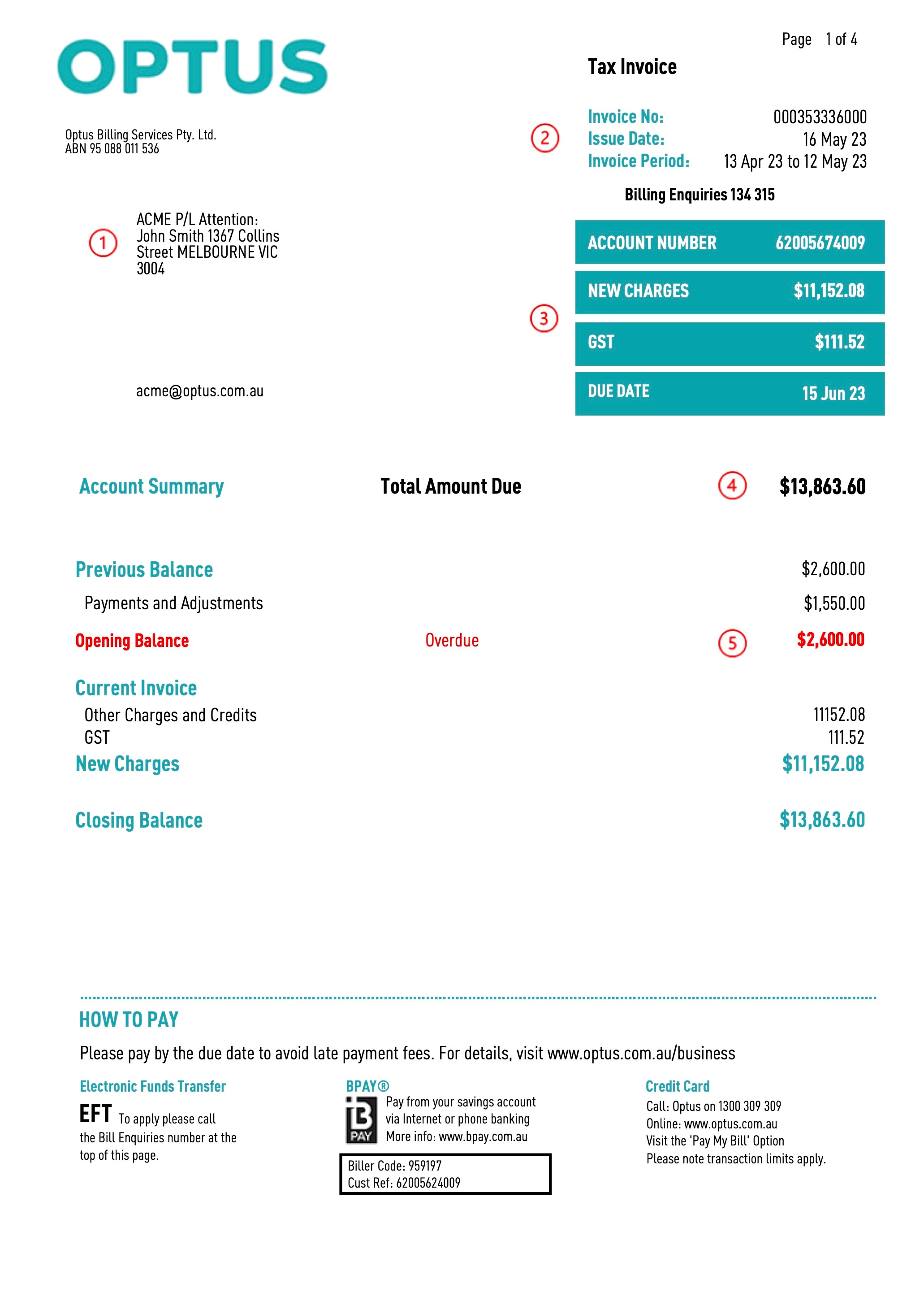
Page 1

1. Name and address details: Email address (that invoice might be sent too) This can also include other relevant billing data for your team e.g. Purchase Order Number, Contract Reference, Building Name etc.

2. Invoice Number: Unique invoice reference number for this bill.

Date: The date the invoice/bill was issued.

Invoice Period: The period that the charges apply to.

Note - The invoice charge period is for the current month, but a managed account is generally charged in arrears (see page 4).

3. Customer Account Number: This, coupled with your Invoice Number, allows us to pinpoint any charges that you may be enquiring about.

New Charges: Charges for services charged on page 4 or the current period.

Due Date: The latest date that payment should be made. This is static at 30 Days or as otherwise set out in your contract.

4. Total Amount Due: This includes new charges and any overdue/brought forward/opening balance.

5. Opening Balance: This is the total value of overdue amounts that have remained unpaid from previous bills. Any payments made 5 days prior to the issue date will be included in the current invoice (excluding bank processing times).

Page 2

6. Check out more online: For more details, you can log into My Business Portal or InsightPlus for more reporting options. However, if you received a summary bill with an “Account Charge Breakdown” section on the last page, your account is managed. To find your itemised details, please log into the “eFRAMS” reporting tool instead.

Alternate Bill Payment Method: Ensure that any alternate payment includes your invoice and account number.

Note – Some charges from previous months may appear on your bill. This is because they were processed after the relevant invoice period.

Page 3

7. The Charge Summary shows a summary of charges and discounts that are detailed within the bill. This summary groups your charges by description.

The quantity identifies the number of active services, regardless if they are charged.

- Mobile can include Data, Calls, SMS, MMS, Voicemail, Rate Plans or S&E (Service and Equipment – monthly charges).

-Data can include S&E (Service and Equipment – monthly charges), upload and download internet fees.

-Hardware (handsets or any physical device) will show as Equipment with a reference number to the “Optus Purchase Order”.

-Inbound is for any usage (National, Mobile or Local) and monthly fees attached to 13, 1300 and 1800 services.

-Outbound can include usage (Local, Fixed to Mobile, DC to Local, National etc.) and monthly fees attached to PSTN, ISDN, Multiline and Evolve Voice services.

-Managed Services related to ICT, such as cloud calling, Teams, Routers, storage equipment and racks (data centre).

Note - The Charge Summary for managed accounts will only display a total for the breakdown see point 9 (page 4).

Page 4

8. Payments: This shows any payments made on the account during the Invoice Period (see page 1).

Payments are normally due within 30 Days or as set out in your contract.

If any charge is in dispute, only that charge amount can be withheld until the dispute is resolved. The rest of the invoice is payable.

Adjustments: Adjustments made since your last bill. This may include, for example, Excess Usage Fees, Service Cancellation Fees, etc.

9. For managed accounts, the Account Charge Breakdown groups your charges by product and the inventory description.

Examples of charges:
-Mobile charges have separate entries for data usage, calls, messaging and monthly fees.

-Data charges can be for monthly fees, usage and additional service features (quality of service, etc.)

-Managed charges are for ICT and can include handset, features, monthly fees.

-Equipment References  are normally for handsets or hardware.

-Inbound charges are those related to fixed line charges, including monthly fees, usage and features.

-Outbound charges are for 1800,1300 and 13 numbers.

-Managed Services relate to ICT such as cloud calling, Teams, Routers, storage equipment and racks (data centre).

Cannot find what you're looking for? Please contact the Optus Service Desk or log an enquiry via My Business Portal

Pro-Rate Calculation – Bill Type 1
  • $Total charge (ex GST) = $MRC - if the service start date is before the billing period of the current month
  • $Total charge (ex GST) = ($MRC *NAD/NTDM) + $MRC - if the service start date is in the billing period of the current month
  • $Total charge (ex GST) = $MRC *NAD/NTDM - if the service terminated date is in the billing period of the current month

Where

  • $MRC = monthly recurring charge (ex GST)
  • NAD = Number of days the service is active in the current billing period
  • NTDM = Total number of days in the current billing periodOther Charges & Credits: These are one-off charges or credits applied to your account. For example, establishment charges

Helpful Links

  • Standard Agreements
  • My Business Portal
  • Accessibility
  • Media Centre
  • The Optus Network
  • Understand my bill

Business Insights

  • Accelerate
  • Customer Stories
  • About us

Other Optus sites

  • Optus Wholesale

  • Blog
  • Connect With Us on twitter
  • Connect With Us on linkedin
  • Connect With Us on youtube

  • Privacy Policy
  • Terms of use
  • Contact Us

Connect with us

  • Blog
  • Connect With Us on twitter
  • Connect With Us on linkedin
  • Connect With Us on youtube
  • Privacy Policy
  • Terms of use
  • Contact Us
© 2026 Singtel Optus Pty Limited
Optus acknowledges the Traditional Custodians of the lands, waters and skies across Australia. We pay our respects to Elders past and present and honour the strength and continuity of the world's oldest living cultures.