Skip to Primary NavigationSkip to ContentSkip to Footer
  • Personal
  • Business
  • Enterprise
  • Deals
  1. Smartwatches>
  2. Spacetalk>
  3. Spacetalk Adventurer 2
Free Delivery
Interest Free Payment Options
Data Sharing
Our Network

Choose your watch & payment terms

Kids watch, app and plan for $29.68 per month. Terms apply
Image gallery of Spacetalk Adventurer 2
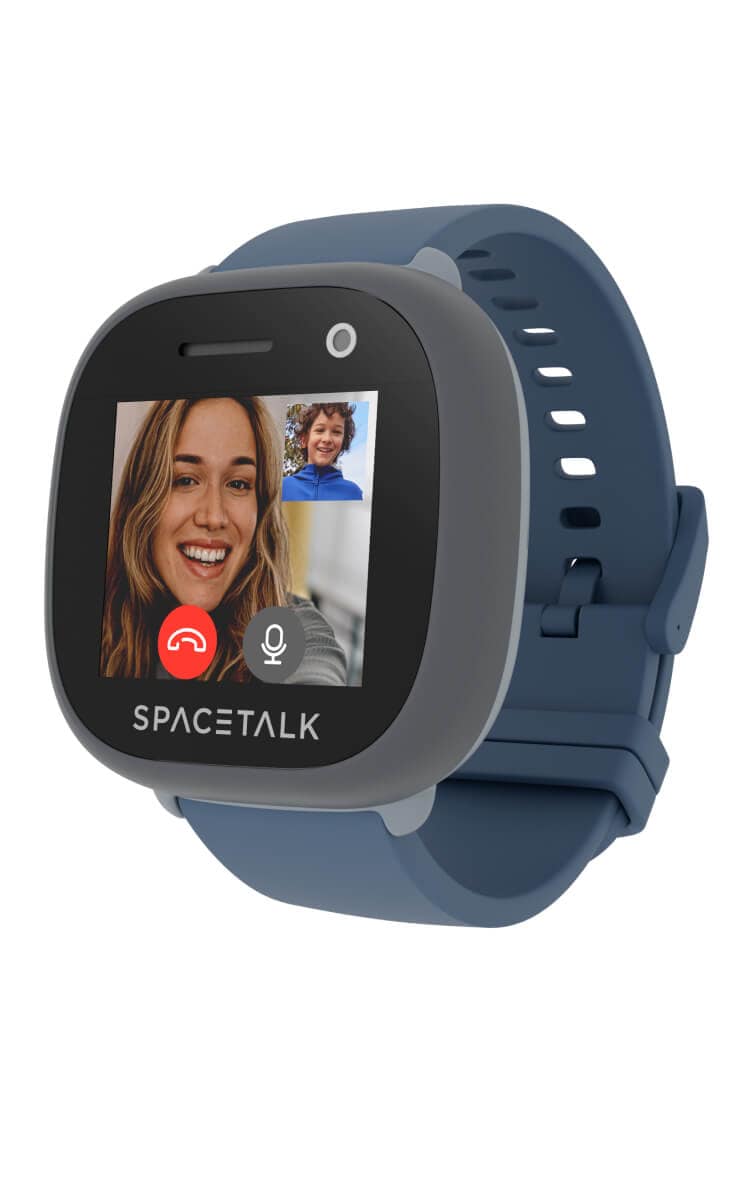
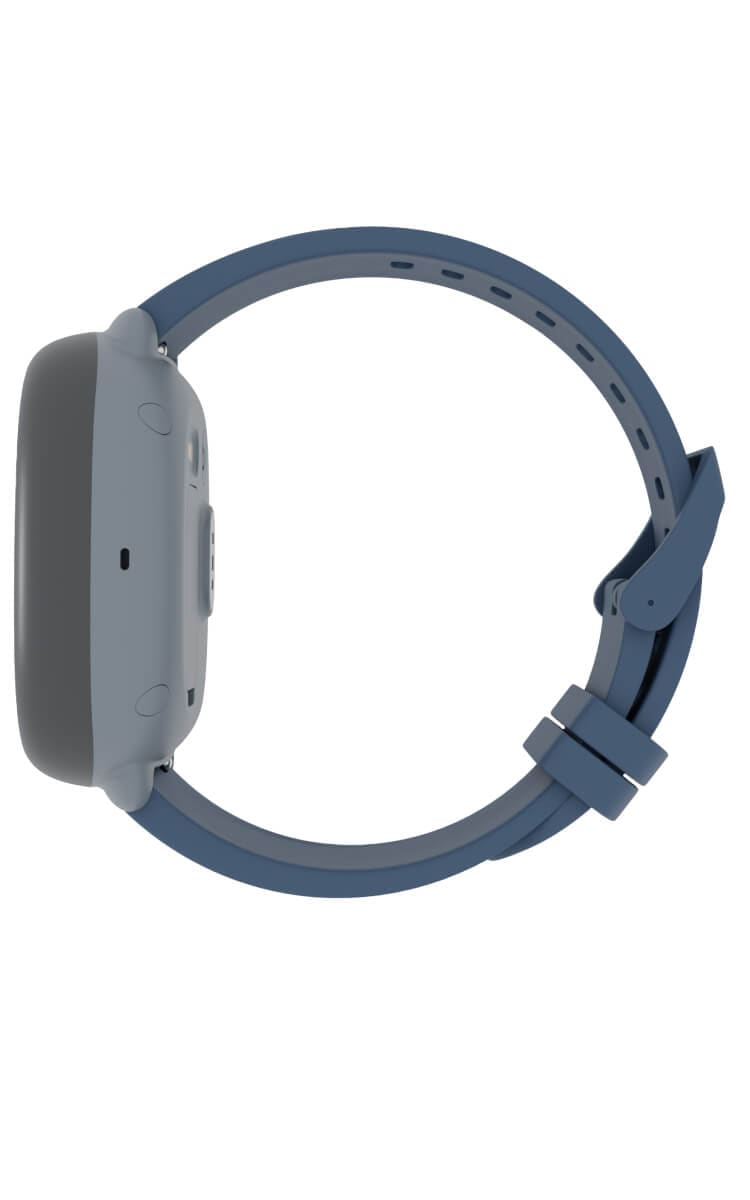
Spacetalk Adventurer 2 Kids Smart Watch in Dusk left view Spacetalk Adventurer 2 Kids Smart Watch in Dusk right viewSpacetalk Adventurer 2 Kids Smart Watch in Dusk back view of band
Current image - no alt text available
Spacetalk

Adventurer 2

Your new watch

Choose your model: 46mm | Dusk
Choose your colour:
Dusk

Customise your band

Choose your band: Standard | M/L | Slate
Choose your band size:
M/L
Choose your band colour:
Slate

All payments are interest free

In Stock FREE express delivery or collect in store. Learn more
$9.68/month
Select Watch

Specifications


  •  Call, text and video call on the Optus 4G network with a stand-alone number, coverage required. Check coverage.
  • Social media-free and no web browsing.
  • Track your device location with in-built GPS using the Spacetalk app.
  • Share data with family members across eligible Optus Choice Plans. 
  • Water resistant and play-proof with a durable watch band.

Peace of mind for you.
Freedom for them.

It's more than just a watch, it's independence for them and peace of mind for you with location sharing, wellness features and no social media.*

*Functionality requires the Spacetalk app and a valid subscription via SubHub (included with Optus Choice Plus Family plan).

Choose your Plan

10GB
$20/month

Choice Plus Family Watch Plan

  • Plan inclusions:

  • 4G network access

  • No lock in contract

  • Unlimited standard national talk & text

  • Data-sharing across eligible plans

  • No excess data charges

  • Exclusive saving

  • Includes Spacetalk App via SubHub (save $5.99 per month)

    Stay connected with location tracking and voice/video calls.

  • Add ons

  • Save up to 10% on subscriptions every month

  • Netflix, Amazon Prime, Paramount+, Kayo Sports, Binge, YouTube Premium and more

All for use within Australia

Critical Information Summary (PDF)

You've selected

Spacetalk Adventurer 2
46mm,Dusk - 36 months
$9.68/month

Add a plan to proceed

Total

$9.68/month

Minimum cost $348.48. Includes device payments over 36 months and one month of your chosen plan fees.

Network Icon

Check out our Network Coverage available at your residential address and other critical locations before completing this order.

Why Optus?

Free delivery

Shop online and get free delivery nation-wide.

Network

Our combined 4G and 5G network covers 98.5% of Australians, and our 5G network is progressively rolling out. Check coverage.

Number Share

Share one mobile number between eligible devices. Enjoy the ease of taking your smart watch while leaving your phone behind.

LIFECYCLE

From kids to teens.
Stay connected with Optus.

Get your kids started with a Smart Watch on a Optus Plus Family Watch plan. Keep the number when they transition to a mobile phone, hassle-free.

How does it work?

When you buy a Spacetalk Adventurer 2 Smart Watch, the watch will include a standalone phone number for easy calling and texting. Once your kids are ready to transition to a mobile phone, you can use this same number with any new mobile plan you purchase.

This way, you don’t have to worry about your kids changing numbers with each new device.

SUBHUB SETUP

SubHub and Spacetalk

How to set up Spacetalk App via SubHub

Set up the Spacetalk App via Optus SubHub to make full use of your Spacetalk Adventurer 2 Kids Smart Watch. Here’s how:
  1. Purchase the Spacetalk Adventurer 2 Kids Smart Watch and plan.
  2. When you've received the smart watch, head to the SubHub page, you'll need your My Optus login. You can find this page via My Optus app, via the QR code on the brochure delivered with your watch or through the link in your SIM activation email.
  3. Log in to SubHub, find the Spacetalk app under your included subscriptions, and click or tap "activate".
  4. Once redirected to the Spacetalk sign-up page, enter your personal details and create an account to activate. If you already have a SpaceTalk account, note the important information below.
  5. You will then be directed to download the Spacetalk app via the Google Play Store for Android devices or the app store for Apple devices. Once downloaded follow the prompts to login to your Spacetalk account and complete the activation.
  6. After activation, insert your Optus SIM card into the smart watch and follow the prompts to pair the watch with your Spacetalk account. Accept the pairing request on your watch and it’s ready to use.


Important information

If you already have a Spacetalk account, you’ll need to log into your existing account and cancel your current subscription before creating a new account with SubHub. Once your account has been created via SubHub, you'll gain free access to the Spacetalk app and subscription as part of your Watch Plan and it’ll be listed under “SubHub” on your monthly invoice on My Optus app.

SubHub provides a single subscription to Spacetalk App per Optus account, with the Spacetalk app allowing a maximum of 20 registered devices simultaneously. 

You can create/sign in to your SubHub account via the SubHub platform at subhub.optus.com.au or via the link in My Optus app. You will need to use your Optus My Account customer login details to log in. To add Content Service subscriptions (including Spacetalk) to the SubHub platform, you can follow the sign-up process on the SubHub platform.

How to set up Spacetalk App via SubHub

Set up the Spacetalk App via Optus SubHub to make full use of your Spacetalk Adventurer 2 Kids Smart Watch. Here’s how:
  1. Purchase the Spacetalk Adventurer 2 Kids Smart Watch and plan.
  2. When you've received the smart watch, head to the SubHub page, you'll need your My Optus login. You can find this page via My Optus app, via the QR code on the brochure delivered with your watch or through the link in your SIM activation email.
  3. Log in to SubHub, find the Spacetalk app under your included subscriptions, and click or tap "activate".
  4. Once redirected to the Spacetalk sign-up page, enter your personal details and create an account to activate. If you already have a SpaceTalk account, note the important information below.
  5. You will then be directed to download the Spacetalk app via the Google Play Store for Android devices or the app store for Apple devices. Once downloaded follow the prompts to login to your Spacetalk account and complete the activation.
  6. After activation, insert your Optus SIM card into the smart watch and follow the prompts to pair the watch with your Spacetalk account. Accept the pairing request on your watch and it’s ready to use.


Important information

If you already have a Spacetalk account, you’ll need to log into your existing account and cancel your current subscription before creating a new account with SubHub. Once your account has been created via SubHub, you'll gain free access to the Spacetalk app and subscription as part of your Watch Plan and it’ll be listed under “SubHub” on your monthly invoice on My Optus app.

SubHub provides a single subscription to Spacetalk App per Optus account, with the Spacetalk app allowing a maximum of 20 registered devices simultaneously. 

You can create/sign in to your SubHub account via the SubHub platform at subhub.optus.com.au or via the link in My Optus app. You will need to use your Optus My Account customer login details to log in. To add Content Service subscriptions (including Spacetalk) to the SubHub platform, you can follow the sign-up process on the SubHub platform.

SubHub and Spacetalk

SPECIFICATIONS

Spacetalk Adventurer 2 Smartwatch specifications

2 The wellness features are currently available on Spacetalk devices purchased through the Spacetalk online store and approved retail partners only. Spacetalk is a consumer grade general wellness device, not a certified medical device. Spacetalk wellness features are not intended for medical diagnostics. The information provided in this website or the Spacetalk mobile application is not a substitute for obtaining proper professional care or services. You should seek independent advice from a medical professional as required.

TERMS AND CONDITIONS

Fair Go Policy applies.

How we calculate total minimum cost: Your min. cost is the minimum total amount you will be required to pay, when you sign up to a SIM plan or a SIM plan with a device payment plan.

  • When you sign up to a month to month SIM plan without a device payment plan, your min. cost is one month of your SIM plan fee.
  • When you sign up to a month to month SIM plan (which includes a plan fee discount) without a device payment plan, your min. cost is one month of your discounted SIM plan fee.
  • When you sign up to a month to month SIM plan with a device payment plan, your min. cost is the cost of your device in full plus one month of your SIM plan fee.
  • When you sign up to a month to month SIM plan (which includes a plan fee discount) with a device payment plan, your min. cost is the cost of your device in full plus one month of your discounted SIM plan fee.
  • When you sign up to a month to month SIM plan with a device payment plan (which includes a device discount), your min. cost is the cost of your device in full (less one month of your device credit amount) plus one month of your SIM plan fee.
  • When you sign up to a month to month SIM plan (which includes a plan fee discount) with a device payment plan (which includes a device discount), your min. cost is the cost of your device in full (less one month of your device credit amount) plus one month of your discounted SIM plan fee.

No other discounts or bonus offers are factored into your min cost.

Changes to Plans (month to month): We may make changes to your month-to-month Family Watch plan, including to the price or inclusions. This could include moving you to a new plan, which may cost more. We’ll give at least 30 days’ notice of any increase to plan access fees, any data inclusion decreases or any plan moves. If you don’t like the change, you can choose a new plan (once per payment cycle) or cancel.

Optus Choice Plus Family Watch Plan: The Optus Choice Plus Family Watch plan is only available as a bundled service with the Spacetalk Adventurer device to eligible new and recontracting customers. The cost of the Spacetalk app subscription (RRP$5.99) is included in the plan when you activate it via Optus SubHub. Customers can choose to take up their Spacetalk watch outright or sign up to a 12, 24, 36 month payment plan. If you need to cancel your plan, there are no plan cancellation fees and you will not receive a pro rate refund for the remainder of the payment cycle, unless otherwise provided in our standard agreement and subject to your consumer law rights. Your related device payment plan will be cancelled, and you’ll have to pay out any remaining payments owing as a one-off payment with any device credits or discounts forfeited. You cannot rate plan change off this plan unless you transfer your allocated number to a mobile phone. If you rate plan change off the plan, you cannot re-activate the plan. Roaming is not available in all destinations with this device, see the Roaming terms.  You will automatically be charged via card on your monthly invoice date. You must maintain your card payment details or your plan will be cancelled. Limit of one Optus Choice Plus Family Watch plan per eligible device payment.

Device Payment Plans (OptusPay): You must have an eligible Optus plan to add a Device Payment Plan. If you need to cancel your Device Payment Plan before the end of the agreed term, or you need to cancel your related eligible Optus plan during the Device Payment Plan term or you want to move to an ineligible plan during the Device Payment Plan term, then you’ll need to pay out the full remaining cost of your device. Device credits or discounts that Optus was going to cover do not apply in these cases. Limit of one related device payment plan per Family Watch plan. You will be automatically charged via card on your monthly invoice date. You must maintain your card payment details or your plan will be cancelled.

Device Discount: If you have device discounts, they will apply for the duration of your payment plan. Device discounts are available as advertised for customers who purchase this device on an plan, as specified above. Discount applied over length of payment plan selected and applied from the first invoice for the device payment. The discount will be forfeited if the customer cancels, recontracts or changes to an ineligible plan, and the customer will have to pay out the remaining device payments excluding the device discount. See above for offer end date. If no date is specified, the offer is available until withdrawn.

No Excess Data Charges: If shared data allowance is exceeded, all shared data services on your account will be slowed to a maximum speed of 1.5Mbps (suitable for general internet browsing and music streaming, however some activities such as video streaming may see increased buffering and loading times). Usage while slowed is unmetered. Applies to data usage in Australia only.

Usage Alerts: Usage alerts are typically real-time but delays of up to 48 hours may be experienced. You will receive alerts in Australia and while roaming overseas via your nominated email. However, you can change your preferred method of receiving usage alerts and service notifications anytime by visiting My Account. To learn more about usage alerts, click here.

My Account: Services that share data may have a service login to My Account which will display all service numbers contributing or using the shared data pool on the account. If you have more than 6 services you may not be able to use My Account to monitor usage or add/change alerts.

Coverage: Coverage availability will vary depending on your device and location. Check coverage at optus.com.au/coverage.

Optus Daily Roaming: The Spacetalk device does not work in certain countries. You must check if the LTE bands supported by the Spacetalk device are available in the Zone 1 destination you want to roam in. The supported bands are B1, B3, B5, B7, B8, B20, B28(AB).  You will also need to enable roaming on your device using the last 4 digits of your device IMEI as the password.  Optus Daily Roaming is a $5 add-on that is automatically activated via the My Optus App. Daily Roaming is available on Consumer Choice Plus, Business Choice Plus plan, and MBB plans in Zone 1 destinations. For Choice Plus, Business Choice Plus plans with no Roaming inclusion with expired roaming inclusion within 30 days and MBB data plans you will be automatically charged via card upon first usage in an eligible destination. If your payment fails you will need to check your payment details are correct, and all roaming usage will be restricted. Usage alerts are sent at 50%/85%/100% of your data inclusions. Optus Daily Roaming includes 5GB data as well as unlimited standard national talk and text in Zone 1 destinations or to Australia (standard national talk is not available with MBB plans). Optus daily roaming expires once the 5GB of data is used or once the add-on 24 hour duration has ended (whichever is first). If you continue to roam in eligible destinations, we’ll automatically add another 5GB to your service, and you will be charged $5 for the further add-on. Unused data expires. Eligible destinations are subject to change, see current list at optus.com.au/roam. Fair Go Policy applies.
ACCESSIBILITY

You can find free, independent, up to date information about telecommunication goods and services that are suitable for seniors and people with disabilities by visiting Accessible Telecoms (opens in a new tab) – use the search bar or follow the three steps. You can also get help finding a device with accessibility features that work best for you by visiting the Mobile & Wireless Forum Global Accessibility Reporting Initiative (GARI) (opens in a new tab).

Related articles

Three kids playing outside wearing smartwatches
Should parents buy their children a kids smart watch or kids phone?
Dive into the wearable-for-kids trend and decide whether buying a kids' smart watch for your children is a worthwhile investment over a kids' phone.
Read more
All-in-one kids watch on wrist.
Spacetalk Adventurer 2 Kids Smart Watch Review
Ready to introduce your kid to the world of tech? Discover the all-in-one kids smart watch designed to give parents peace of mind while also being a fun and fashionable for kids.
Read more
Photo of a spacetalk watch on the wrist of a young person.
Spacetalk Adventurer 2 How-To Device Guide
Make the most of your Spacetalk Adventurer 2 Kids Smart Watch with the Optus device guide, including basic functions, activation, and connectivity information.
Read more

Support

Frequently asked questions

Can I connect the Spacetalk Adventurer 2 to WiFi?

Yes, the watch can connect to WiFi and also operates on the Optus 4G Network with the Optus Choice Plus Family Watch Plan. To connect to local WiFi, swipe down from the top of the watch screen then press and hold the WiFi icon. Move the WiFi switch to the ‘on’ position, then press '+' in the top right corner. Select the Wi-Fi network SSID you wish to connect to, then enter the password for that network. Finally, press the blue tick to confirm and connect. WiFi can assist with mobile data usage, however the watch requires mobile data and credit allowance to connect to the network and allow some of the functions to work, including device tracking.

Are Spacetalk Watches waterproof?

Adventurer 2 has a dust and water-resistant rating of IP67, making it splash proof and protected up to a depth of 1 metre for a duration of up to 30 minutes. Splash, water and dust resistance are not permanent conditions and resistance might decrease as a result of normal wear. Spacetalk does not recommend actively swimming or bathing while wearing Spacetalk Adventurer 2.

    Does the Spacetalk Watch have games?

    Spacetalk Adventurer 2 has no games, social media or internet browser, so it keeps curious eyes away from harmful content.

    • No social media functions. 
    • No calls or texts from people outside your safe contact list.
    • No web browser - so no exposure to inappropriate content.

    What if I purchase a Family Watch plan but do not activate the Spacetalk subscription within SubHub?

    The free Spacetalk app subscription which is included with your Family Watch Plan will not be available to you unless you activate your Spacetalk subscription via the Optus SubHub platform using your My Account details.  

    Note: the Spacetalk Adventurer 2 watch requires the Spacetalk app and a valid subscription to utilise the watch to its full functionality. Without the app and subscription you will not have access to the full features of the watch including many parental controls. 

    How do I sign up to SubHub for my plan’s Spacetalk inclusion?

    You can create/sign up to your SubHub account via the SubHub platform at http://subhub.optus.com.au or via the SubHub link in My Optus app.  You will need to use your Optus My Account customer login details to log in. To add Content Service subscriptions (including Spacetalk), you can follow the sign-up process on the SubHub platform.

    When should I activate my Spacetalk subscription within SubHub if I have purchased the Family Watch plan?

    The free Spacetalk subscription included with your Family Watch Plan applies when your service is active (i.e. the plan and watch are operational). If you activate your Spacetalk inclusion before you have received your SIM and Watch (before it is active on the Optus Network), you will be separately charged for Spacetalk by Optus until your Family Watch plan becomes operational. 

    If you do not want to be charged for your Spacetalk subscription, we recommend waiting until your equipment is delivered before you activate your Spacetalk subscription via SubHub. 

    What if I buy more than one Family Watch plan, will I get more than one Spacetalk subscription?

    Currently, if you buy more than one Family Watch plan with an included Spacetalk subscription, you can only activate the Spacetalk subscription through SubHub once. However, the Spacetalk app subscription can support up to 20 Spacetalk watches.

    Am I able to change my delivery address after I've made an order?

    Once your order has been processed you won't be able to change your delivery address, so make sure to put in the correct address when placing your order.

    What identification details do I need when buying a Smart Watch?

    Whether you're ordering online, on the phone or in store, make sure to have your ID and employment details handy as we'll need them for the credit check to process your order.

    Do I need to be there when my Smart Watch is delivered?

    Yes, we'll need you to provide Proof of ID and sign for your Smart Watch when it's delivered. If you miss the delivery, your Smart Watch will be delivered to the closest post office for you to pick up.

    Are there any cancellation fees on the Choice Plus Family Watch Plan?

    There are no cancellation fees. If you cancel your plan, you will need to pay out any remaining payments for the device if you have chosen a device payment plan option, plus all charges outside of your plan inclusions which have been incurred up until the end of the payment cycle in which the service was cancelled.

    Note: if the watch plan is cancelled and you still have a SubHub account connected to your Optus service, your Spacetalk account will not be automatically cancelled. You will need to cancel your SpaceTalk subscription directly within the SubHub platform.

    Can I change my plan from the Choice Plus Family Watch Plan?

    You can change your SIM plan provided you are looking to move your service to a mobile phone. The Spacetalk Adventurer Watch can only be used with the Optus Choice Plus Family Watch Plan. Customers who intend to rate plan change should be advised to transition to an Optus Choice Plus mobile plan and mobile device. Once you rate plan change off the Choice Plus Family Watch plan, you cannot rate plan back on to the plan.

    Can I use international roaming with my Spacetalk Adventurer?

    While our Optus Choice Plus Family Watch plan supports Optus Daily Roaming, customers who intend to roam with a Spacetalk device on the Optus Choice Plus Family Watch plan should consider if Optus Daily Roaming is right for them as the Spacetalk device won’t work in certain countries. Roaming will need to be enabled in your Spacetalk device settings which is password protected (last four (4) digits of the device IMIE.  

    Customers must check their destinations compatibility based on LTE bands available supported by the Spacetalk adventurer device against Optus Daily Roaming eligible Zone 1 destinations. Check the Zone 1 countries available at International Roaming – Optus. The Spacetalk device will be incompatible in certain destinations. 

    Device compatibility is dependent on LTE bands supported by the Spacetalk adventurer device: B1, B3, B5, B7, B8, B20, B28(AB). Customers can switch the device onto Flight Mode via the watch settings to ensure that no Daily Roaming usage or charge is triggered by the device.

    How will I receive Emergency and Service communications from Optus?

    The Spacetalk Adventurer device blocks communications that are not on your Trusted Contact List. This includes emergency and service communications.  

    Emergency communications can be viewed via the handset paired with the Spacetalk app and active subscription and will appear as a notification within the Spacetalk app, which can be viewed and retained within the notifications section. 

    Service communications are sent to the Optus account holder for the plan via SMS or email. If the watch number is recorded as the number for the account holder, service communications can be viewed via the handset paired with the Spacetalk app and active subscription and will appear as a notification within the Spacetalk app, which can be viewed and retained within the notifications section.

    Still have questions?

    Chat with us now

      Call 1800 700 749

      Visit an Optus store

    More from Optus

    • My Optus App
    • SubHub
    • Accessories
    • Student Hub

    Customer Service

    • Contact Us
    • Help & Support
    • Store Locator
    • Payment Assistance Policy
    • Feedback & Complaints
    • Report a service outage

    About Us

    • About Optus
    • Careers
    • Corporate Information
    • Media Releases
    • About Singtel
    • Accessibility

    • Blog
    • Connect With Us on facebook
    • Connect With Us on instagram
    • Connect With Us on tiktok
    • Connect With Us on linkedin
    • Connect With Us on twitter
    • Connect With Us on youtube

    • Critical Information Summaries
    • Standard Agreement
    • Privacy, Security & Safety

    Connect with us

    • Blog
    • Connect With Us on facebook
    • Connect With Us on instagram
    • Connect With Us on tiktok
    • Connect With Us on linkedin
    • Connect With Us on twitter
    • Connect With Us on youtube
    • Critical Information Summaries
    • Standard Agreement
    • Privacy, Security & Safety
    © 2026 Singtel Optus Pty Limited
    Optus acknowledges the Traditional Custodians of the lands, waters and skies across Australia. We pay our respects to Elders past and present and honour the strength and continuity of the world's oldest living cultures.
