Samsung Galaxy Z Flip4 full review
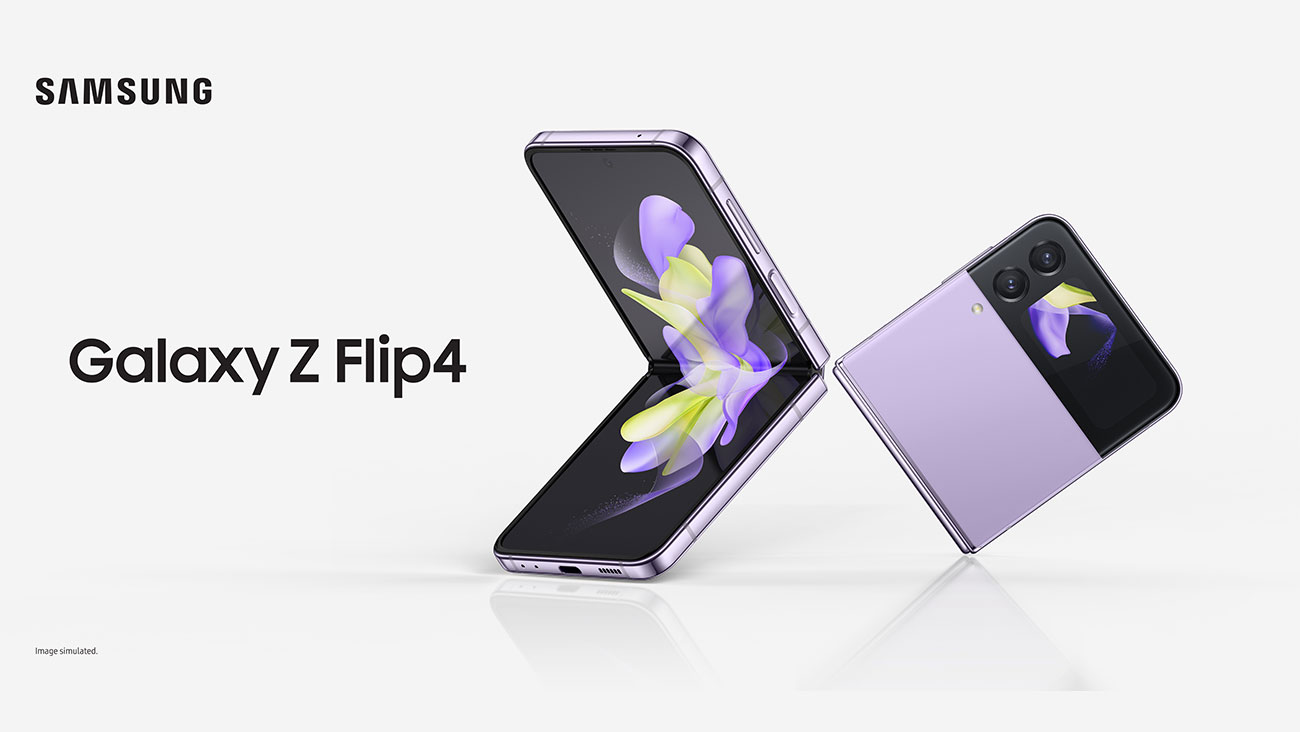
Image credit: Samsung
Samsung Galaxy Z Flip4 is live, and we can’t stop talking about it. You can order your Z Flip4 with Optus and enjoy interest free device repayments on an eligible plan with OptusPay.
Samsung has come a long way since 2020 when it first launched the Galaxy Z Flip phone series. While packed with novel features, including a glass screen that can bend, the first Flip phone did leave quite a lot of room for improvement.
But with the Flip4, Samsung has made incremental changes to an already refined phone. Let’s deep dive and find out how.
You can also read my review on the Samsung Galaxy Z Fold4 and order your Fold4 from Optus.
Is the Galaxy Z Flip4 “the one” for you?
If you’re into foldables, then YES. If you dislike the idea of your phone popping out of your side pocket, then absolutely!
The Z Flip4 is also a good option if you like experimenting with trendy colours, are into photography and want something stylish to show off.
With this generation of the Z Flip4, Samsung’s got a chance to make changes and iron out issues. The result is a phone offering a great user experience and the ability to customise it to suit your personal style. If you’ve been waiting to get a folding smartphone, now is the time.
If you want something that really adds to your productivity, Samsung Galaxy Fold4 may be the right choice for you.
Galaxy Z Flip4 Cons:
- Expensive – although you can also buy the Galaxy Z Fold4 on an eligible plan and pay interest free device payments with OptusPay.
- Visible Crease
Galaxy Flip4 comes in four colours. There’s Bora Purple – a light lavender colour that reminds me of Jacarandas, graphite – a simpler black colour, pink gold – which oozes sophistication and blue – a classic beauty.
In terms of the structure, if you think the Z Flip4 looks the same as the Z Flip3 at first, that is not your fault. Samsung’s made some tweaks to the design but overall it retains the Z Flip3 model.
What has changed is the Z Flip4 bezels are slimmer, giving more screen size with the same dimensions. In fact, thanks to a noticeably smaller hinge as compared to Z Flip3, Samsung’s managed to create the same magic in a smaller size.
The smaller (a tad more rounded) hinge translates to less protrusion and adds to the compact feeling one gets with a clamshell type device as the Z Flip4.
When folded the Z Flip4 at 84.9mm is shorter vs Z Flip3’s 86.4mm. I did not feel the difference honestly but then I was also pretty happy with the Z Flip3 – it was short enough for me. Unfolded too, the Z Flip4 is a tad smaller than the Z Flip3 but the difference is not really obvious.
Galaxy Z Flip4 folded is a colourful phone that can neatly fit in your pocket
Galaxy Z Flip4’s cover screen has noteworthy additions in photography.
I think Samsung’s win is not in terms of creating anything “ground breaking” but just giving a better phone experience around things we may not realise but which matter quite a bit.
What I love about the Flip series in general is that they are so tiny and compact when folded. For once, I can put in the whole phone in my side pocket (but I probably would not, owing to its thickness when folded).
When unfolded, they are narrower in width than your average smartphone which means it fits better when holding it. But then the Flip4 is also longer than a normal smartphone which means it does not quite pass my four-corner test: I cannot reach all four corners of the phone with one hand.
Clamshell design: Now to my favourite part – the feature that lets me go hands free and still watch videos and content on the phone. With the Flip4, I LOVE that I do not have to prop my phone against a bottle or book or worse hold it in my hand.
I don’t know how many have experienced this but when I hold my phone to view content, it gives me a stiffer neck after a while because I cannot hold my hand up in the air for a long period. With the Flip4, I can simply pop it open, place it on a flat surface at an easy height and have both hands free to do other stuff.
One thing I really enjoy doing is talking to my mum while cooking (so I can brag about what an amazing chef I am) and that usually means a lot of shifting trying to find a good location and then trying to find an angle while ensuring the phone does not fall flat on its face (It has. So many times.).
To add to user experience, Galaxy Z Flip4 has also worked on making apps like Youtube videos fit the screen when in Flex Mode[3]. So the upper half of the Flip4 shows content while the lower half shows the control buttons for the app.
The cover screen is the same in terms of design form but Samsung has added a lot more in terms of usability and customisation.
Z Flip4’s cover screen display features a 1.9 inch Super AMOLED panel and a refresh rate of 60Hz. It’s the same as Flip3 but as mentioned previously, the charm of Flip4’s cover screen is around user experience rather than any ground breaking technical prowess.
The Flip4 unfolded features a 6.7-inch Full HD+ 'Dynamic AMOLED 2X panel[4]. What that means is more contrast and an experience that’s as close as possible to reality.
The phone when folded, shows both cameras on a black strip that extends across the phone and is also the cover screen. This ingenious use of the Galaxy Z Flip4 real estate still impresses me after all these years.
What that translated for me personally was higher brightness levels, especially true under the sun and outdoors. Also, the colours were deeper and richer when viewing video content.
We cannot talk about display and not highlight the mind blowing innovation that is the foldable glass screen. During Samsung’s Unpacked 2022 event, Samsung gave a glimpse of how it creates its iconic Ultra Thin Glass. This glass is one third the thickness of human hair and can withstand opening and closing up to 200,000 times, according to Samsung.
Galaxy Z Flip4 in Flex mode adds hands-free photography and video taking abilities.
Initial look: Galaxy Z Flip4 unfolded has a gentler crease.
Personally I did not care too much of the Flip series when they launched because having a crease smack dab in the centre of your phone isn’t a pretty sight. Or so I thought.
With the Flip4, my display experience did not suffer and there were times I barely noticed the crease. And even then, the benefits of the Flex Mode alleviate most of my concerns around a clamshell design model.
The Flip4 also features a 120Hz refresh rate which translates to a very smooth scroll experience - browsing through my newsfeed was super smooth. With Flip4 though, you can choose to reduce the refresh rate in order to conserve battery levels via the Motion Smoothness setting.
Z Flip4’s cover screen is my favourite part of the phone. It features the maximum improvements by Samsung, improvements that really bring up the level of user experience.
You can carry across the look and design of your Galaxy smartwatch to match your smartphone, which improves your ability to personalise.
You can make and add your own videos and add them as wallpaper. This is my favourite feature of the day. With the Z Flip4, you can take short clips and use them as gif wallpapers.
With this particular feature, I think Z Flip4 has done a tremendous job with giving users more room to add their personalities to their phones. I can imagine a LOT of users, especially Gen Zs who are used to scrolling through and creating short reels, loving this feature.
On the cover screen, you can also click photos in the portrait mode, use both wide and ultra wide angles AND change the aspect ratio of your photos. Why am I harping about it? Because with the flexibility to play around with aspect ratios, Z Flip4 makes it easy to take photos in sizes that are curated before-hand for that particular platform - like Instagram or Tiktok. No more annoying spaces around your content. And you can do all of this without even unfolding the Z Flip4. Talk about boss mode.
There are a lot of options of widgets to add on your cover screen – you can add weather info, alarm, voice recorder, timer and direct dial. You can also enhance your productivity with the calendar and planner.
Z Flip4 features a main and an ultra-wide camera at the back but does not offer a telephoto zoom lens. But I think what it lacks in terms of quantity, it makes up in quality.
The camera lenses on the Z Flip4 are a 12MP main camera, 12MP ultra-wide camera and a 10MP front camera.
According to Samsung, the sensors for the main camera are bigger and so pixels are about 30% larger. Simply said, this should help capture low light photos well. I agree with this analysis, having tried clicking photos in night mode.
Samsung’s always been known for great photography and the Snapdragon 8+ Gen 1 processor helps even more with getting great quality photos.
While I’ve already mentioned some points around camera use from the cover screen, I think the theme here is giving users a quick, hassle free photo clicking experience. You’re at a club with your partner and want to snap a photo in the moment (maybe your favourite romantic number comes up) – with Z Flip4, this becomes a more instant experience without needing to actually unfold the phone.
Now we come to the Flex Mode. Galaxy Z Flip4 Flex mode gives us the flexibility to go hands free and take photos.
You can play with it till you find the right angle – with the camera transforming into a sort of tripod here. It certainly could find utility with content creators who want to create something on the go and can do it hands free.
A special shoutout is the nightography or photos in night mode. From an initial comparison, it appears the Galaxy Z Flip4 gives a delightful experience when it comes taking photos in low lights
Galaxy Z Flip4 comes equipped with the Qualcomm Snapdragon 8+ Gen 1 silicon, a power house that can run games, apps and more without batting an eyelid. I did not notice any lags even with around 10 apps running in the background. The phone has 8 GB of RAM that can be paired with a 128GB, 256GB or 512GB in storage[5].
Theme carry over: Samsung’s Galaxy Themes offers a number of options for matching your main display and cover screen adding to the feeling of consistency across the screens.
Check out the neat division between the Galaxy Z Flip4 camera screen and controls at the bottom in Flex mode.
Another shot of the Galaxy Z Flip4 in Flex mode (because I clearly can’t get enough of it).
Even with the size almost the same as Flip3, Samsung has managed to squeeze in a bigger battery in the Z Flip4. The Z Flip4 boasts a battery size of 3,700mAh cell, 12% bigger than 3,300mAh battery in the Z Flip3.
Charging is up from 15W for Flip3 to 25W for Flip4[6]. Wireless charging is also an option at 15W which is a huge plus point for me. Headphone jacks do not find a place on this device but I am not complaining. The USB-C port does the job for me pretty well.
Galaxy Z Flip4
Operating System Name and Version Android 12 Display Size (in inches) + Type + (Pixel Density) Main display: FHD+ (2640 x 1080) Cover: (512 x 260)
Processor Speed (in MHz/GHz) and Core Count Qualcomm SM8475
Screen size Main: 6.7" Infinity Flex Display Dynamic AMOLED 2X Adaptive 1 ~ 120Hz Refresh Cover: 1.9” Display Super AMOLED
RAM 8GB
Internal Memory + Accessible Space 512GB
Rear Facing camera Megapixels 12MP OIS (Wide, F1.8) 12MP (Ultra Wide, F2.2)
Front Facing camera Megapixels 10MP (F2.4)
Video Capture (Resolution @ Frame Rate) 4K Video Recording
3G Network Bands (in MHz) B1(2100), B2(1900), B4(AWS), B5(850), B8(900)
4G Band FDD: B1(2100), B2(1900), B3(1800), B4(AWS), B5(850), B7(2600), B8(900), B12(700), B13(700), B17(700), B18(800), B19(800), B20(800), B25(1900), B26(850), B28(700), B32(1500), B66(AWS-3)
TDD: B38(2600), B39(1900), B40(2300), B41(2500)
5G Network Bands (Band & MHz) FDD: N1(2100), N2(1900), N3(1800), N5(850), N7(2600), N8(900), N12(700), N20(800), N25(1900), N28(700), N66(AWS-3)
TDD: N38(2600), N40(2300), N41(2500), N77(3700), N78(3500)
Dimensions (L x W x H) 165.2 x 71.9 x 6.9mm (Unfolded) 84.8 x 71.9 x 17.1 ~ 15.9mm (Folded)
Weight 187g
SIM Type Single SIM + eSIM
Battery 3,700mAh (Typical)
3G 4G Supported Yes
5G Enabled Device Yes
GPS Yes
NFC Yes
Bluetooth/Connectivity Yes
Audio Formats MP3, M4A, 3GA, AAC, OGG, OGA, WAV, AMR, AWB, FLAC, MID, MIDI, XMF, MXMF, IMY, RTTTL, RTX, OTA, DFF, DSF, APE
Video Formats MP4, M4V, 3GP, 3G2, AVI, FLV, MKV, WEBM
The Samsung Galaxy Z Flip4 is now available with Optus. Order today and enjoy interest free device repayments on an eligible plan with OptusPay.
Mobile innovation never stops, with the latest Galaxy S25 Series finally landing in Australia. The new Galaxy S25 Series features new Galaxy AI tools, as well as upgraded processors and camera lenses. Check out the Galaxy S25 Ultra for a look at Samsung’s newest flagship phone.
Angelique Thakur works with Optus. She loves to play around with gadgets and is a dog lover. She also enjoys going on hikes and annoying her partner.
* Storage Upgrade Offer Offer available with the purchase of a Samsung Galaxy Flip 4/ Fold 4 made between 11/08/22 – 01/09/22 in an eligible Optus channel. On eligible purchases, get the 512GB for the advertised price of the 256GB variant, or 256GB for the advertised price of the 128GB, as relevant. See www.samsung.com/au/offer/galaxy-z-series-offer/retail-store/terms/ for full T&Cs. If purchased on a device payment plan which is subsequently cancelled, the customer will have to pay out the remaining cost of the device on a pro-rata basis. New & existing consumer and business customers (excl. TechFund and Fleet). Max 5 per account.
**Bonus Tablet offer Offer available with the purchase of a Samsung Galaxy Flip 4/ Fold 4 made between 11/08/22 – 01/09/22 in an eligible Optus channel. Customers will be eligible to receive one Samsung Galaxy Tab A8 Grey 64GB per eligible device, max. 5 per account. New & existing consumer and business customers (excl. TechFund and Fleet). If tablet is out of stock it may be delivered separately.
[1] Rated (i.e. minimum) battery capacity value is 3,595mAh. Actual battery life varies by network environment, features and apps used, frequency of calls and messages, number of times charged, and many other factors. Please see user manual for instructions on how to care for the battery and achieve optimum battery life
Optus innovation: World firsts, Australia firsts and more
23 October 2026
We’re proud of our innovation, with our world firsts and Australian firsts focused on how we improve the experience for our...
Should I buy a foldable phone?
16 October 2026
Interested in buying a foldable phone? Here are some things to keep in mind when you’re shopping around for a device.
Should I buy a smartwatch for my kid?
6 October 2026
A smartwatch can be an awesome gadget for a child, particularly if you want to keep in contact with them or be sure of wher...