Skip to Primary NavigationSkip to ContentSkip to Footer
  • Personal
  • Business
  • Enterprise
  • Deals
  1. Help & Support - Optus/
  2. Articles/
  3. How to report a payment and restore your service

How to report a payment and restore your service

Has your service been barred by Optus due to an overdue bill?

Message us for help below

Note: If you've made a payment via credit card, you don't need to report it. Payments made via credit card are instant and your service will be automatically restored within 15mins - 4 hours.

Messaeg Us    


If you've made a payment via credit card, you don't need to report it. Payments made via credit card are instant and your service will be automatically restored within 15mins - 4 hours.

For all other payment methods, you should report your payment of an overdue bill to us, so we can:

  • Prevent your service from being restricted while the payment is being processed
  • Remove any current restrictions that have been imposed due to a late payment

What if I've arranged a payment extension?

If you've already set up an arrangement to pay your bill at a later date, you don't need to advise us of your payment (as long as payment is made by this new date).

What if my bill isn't overdue?

If your bill isn't overdue, contact us as soon as possible to discuss why your service has been barred.

Note: If you've made a payment via credit card, you don't need to report it. Payments made via credit card are instant and your service will be automatically restored within 15mins - 4 hours.

For all other payment methods, report your payment to us using the instructions below:

My Optus app
  1. Open My Optus app
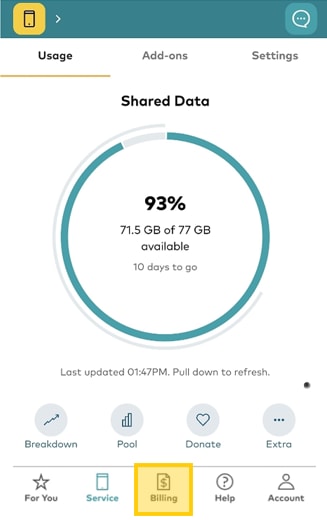
  2. Tap Billing
    Select billing tab in the My Optus app

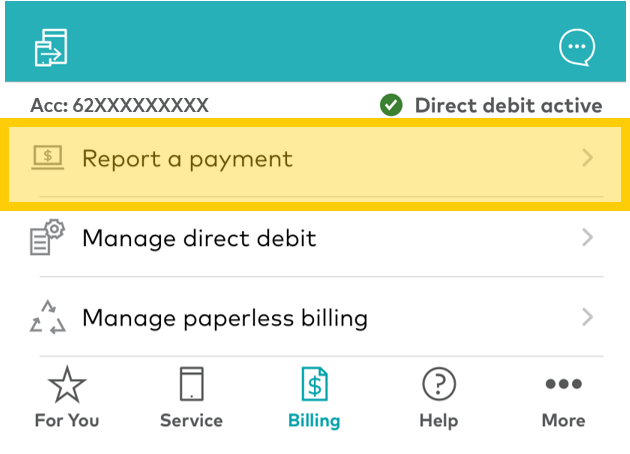
  3. Tap Report a payment
    How to report a payment in My Optus app

  4. Select how the payment was made (e.g. Credit card) and click OK
  5. A successful confirmation message will appear, and any restrictions will be automatically removed

    If your service is still not working after making and reporting a payment, contact us.

    Find out how to request more time to pay your bill here.

    • How do I request more time to pay my bill
    • Financial Hardship Assistance & Policy
    • I need to request a payment extension for my business account
    • Late payment & other billing fees
    Related Articles

    How to change plans

    Change ownership of your service

    My Optus service is not working: troubleshooting index

    A guide to eSIM

    Home Internet WiFi username & password help

    Popular articles

    Orders, deliveries & returns

    How to check network status & outages

    Home Internet WiFi username & password help

    Home Internet troubleshooting

    Get in touch

    • Get My Optus app
    • Contact us
    • Find a store

    Need more help?


    Getting started


    Billing and recharge


    Troubleshooting


    Device Guides


    5G Mobile


    Broadband & NBN


    Manage my account


    Optus Sport


    Email


    5G Home Broadband


    Entertainment


    Coverage and travel


    Home phone


    Business


    Consumer advice


    More from Optus

    • My Optus App
    • SubHub
    • Accessories
    • Student Hub

    Customer Service

    • Contact Us
    • Help & Support
    • Store Locator
    • Payment Assistance Policy
    • Feedback & Complaints
    • Report a service outage

    About Us

    • About Optus
    • Careers
    • Corporate Information
    • Media Releases
    • About Singtel
    • Accessibility

    • Blog
    • Connect With Us on facebook
    • Connect With Us on instagram
    • Connect With Us on tiktok
    • Connect With Us on linkedin
    • Connect With Us on twitter
    • Connect With Us on youtube

    • Critical Information Summaries
    • Standard Agreement
    • Privacy, Security & Safety

    Connect with us

    • Blog
    • Connect With Us on facebook
    • Connect With Us on instagram
    • Connect With Us on tiktok
    • Connect With Us on linkedin
    • Connect With Us on twitter
    • Connect With Us on youtube
    • Critical Information Summaries
    • Standard Agreement
    • Privacy, Security & Safety
    © 2026 Singtel Optus Pty Limited
    Optus acknowledges the Traditional Custodians of the lands, waters and skies across Australia. We pay our respects to Elders past and present and honour the strength and continuity of the world's oldest living cultures.